Your Deep Learning Journey
What is Deep Learning?
Deep learning is a computer technique used to extract and transform data. Its applications range from human speech recognition to image classification and even beyond.
A Brief History of Neural Networks
Neural networks have been around for MANY years now. In fact a lot of the old ideas are actually how we still think about the field.
Parallel Distributed Processing (PDP) by David Rumelhart, James McClelland, and the PDP Research Group, released in 1986 by MIT Press probably contributed one of the most pivotal ideas for deep learning. The approach laid out in PDP is very similar to the approach used in today’s neural networks:
- A set of processing units
- A state of activation
- An output function for each unit
- A pattern of connectivity among units
- A propagation rule for propagating patterns of activities through the network of connectivities
- An activation rule for combining the inputs impinging on a unit with the current state of that unit to produce an output for the unit
- A learning rule whereby patterns of connectivity are modified by experience
- An environment within which the system must operate
Enough boring stuff; let’s create a model
The most fundamental idea of the fastai course is its philosophy of doing first. The course wants you to build a model first and then learn whatever you need to slowly. It takes a top-down approach. So, this is our first model coded completely using the fastai library.
Building a cat vs dog classifier
from fastai.vision.all import *

path = untar_data(URLs.PETS)/"images"

def is_cat(x): return x[0].isupper()

dls = ImageDataLoaders.from_name_func(
        path, get_image_files(path), valid_pct = 0.2, seed = 42,
        label_func = is_cat, item_tfms = Resize(224)
)

learner = cnn_learner(dls, resnet34, metrics = error_rate)
learner.fine_tune(1)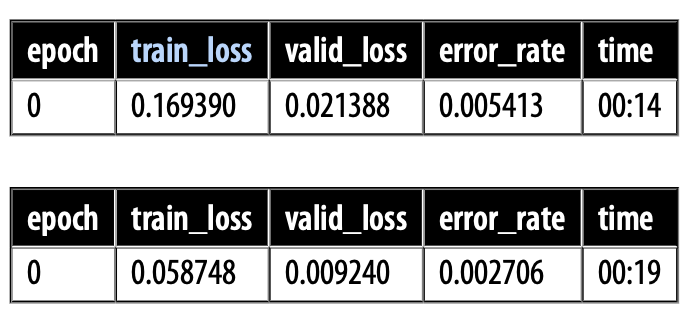
What did we just do?
Importing the library
from fastai.vision.all import *This block of code imports everything from the vision library of fastai. In fact fastai is divided into four application focuses: vision , text , tabular, and colaborative filter.
We are doing some image related task so we use the vision library.
Downloading the data to a path
path = untar_data(URLs.PETS)/"images"FastAI has a bunch of datasets that are already available in the library. A full list can be seen here
The one we are choosing is the PETS dataset. We are giving untar_data the url of the PETS dataset. The function downloads and extracts url, by default to subdirectories of ~/.fastai , and returns the path to the extracted data. Setting the force_downloadflag to ‘True’ will overwrite any existing copy of the data already present. Here, we ask the extracted files to be in the directory ~/.fastai/images
We can inspect the files in the directory using:
path.ls()

(#7393) [Path('/root/.fastai/data/oxford-iiit-pet/images/newfoundland_127.jpg'),Path('/root/.fastai/data/oxford-iiit-pet/images/Siamese_40.jpg'),Path('/root/.fastai/data/oxford-iiit-pet/images/saint_bernard_130.jpg'),Path('/root/.fastai/data/oxford-iiit-pet/images/leonberger_55.jpg'),Path('/root/.fastai/data/oxford-iiit-pet/images/Persian_89.jpg'),Path('/root/.fastai/data/oxford-iiit-pet/images/pug_18.jpg'),Path('/root/.fastai/data/oxford-iiit-pet/images/american_bulldog_9.jpg'),Path('/root/.fastai/data/oxford-iiit-pet/images/British_Shorthair_78.jpg'),Path('/root/.fastai/data/oxford-iiit-pet/images/pug_40.jpg'),Path('/root/.fastai/data/oxford-iiit-pet/images/scottish_terrier_87.jpg')...]
Defining a function to understand if an image is a cat or a dog from the filename
def is_cat(x): return x[0].isupper()This function will be used to get the labels i.e. whether the image x is a cat or not. The way the images are named, you will see that anything that is a cat starts with an uppercase and something that’s not a cat starts with a lower-case. That’s exactly what this function checks.
Building an appropriate Dataloader
dls = ImageDataLoaders.from_name_func(
        path = path, fnames = get_image_files(path), valid_pct = 0.2, seed = 42,
        label_func = is_cat, item_tfms = Resize(224)
)
Dataloaders are these things/tools that allow us to feed our neural network model data. They are extremely important and will be greatly discussed in the future. For now, let’s look at what’s going on in this code specifically.
The fastai datablocks have different layers of API ease/flexibility. The one here is the highest level API which allows us a very easy way to build a dataloader but with little to no flexibility.
You can find more of these ImageDataLoaders here.
What does the
.from_name_funcfunction do? It creates a dataloader from the name attrs offnamesinpathwithlabel_func.
This is exactly what I talked about above. That is the whole point of the is_cat(x) function.
path = pathspecifies the path where the images livefnames = get_image_files(path)gets the images which are the data we will be using to train.valid_pct = 0.2is keeping a certain fraction (\(20\%\) here) of the data for validation set. We will talk about validation datasets later.seed = 42is a way to be able to reproduce our resultslabel_func = is_catspecifies how to get the labels from thefnamesinpathitem_tfmsis a list of transforms that are applied to all the images and happens on the cpu. In this case the only transform isResizeand they are being resized to a size of224 x 224.
All the parameters are found here.
Instantiating and training a learner
learner = cnn_learner(dls, resnet34, metrics = error_rate)
learner.fine_tune(1)
A learner is composed of the following (for now):
- A dataloader -
dls⇒ This feeds the data into the model - A model -
resnet34⇒ This is the neural network. In this case we are using a pretrained model - metrics -
error_rate⇒ A human-readable performance metric to tell us whether or not our model is doing well.
The final line does the actual training. Well in this case what it is doing is fine tuning the pretrainied resnet34 on our dataset. More on fine tuning and pretrained models later.
Using our model to check if an image is a cat or not (Inference)
img_path = '/root/.fastai/data/oxford-iiit-pet/images/Ragdoll_79.jpg'
is_cat,_,probs = learn.predict(img)
print(f"Is this a cat?: {is_cat}.")
print(f"Probability it's a cat: {probs[1].item():.6f}")
Is this a cat?: True.
Probability it's a cat: 0.999991Now that we have a model, let’s see if it’s actually as effective as they say these neural networks are.
We get a hold of one of the images in the dataset (from URLs.PETS), use the learner’s .predict() method and pass in an image to predict.
learner.predict(image) returns a tuple of three items it seems.
- A
booleanof True or False since this is a binary classification (cat or not cat) - A numeric label of True or False which is
1or0 - A tensor of probabilities of associated with the label. In this case it seems the model is \(99.999\%\) sure that it is a cat.
More details can be found in the section How Our Image Recognizer Works in the book (page 26)
Creating other models
Deep learning is not just about images. The first chapter showcases some other ways deep learning can be used and some out of the box examples using fastai.
Image Segmentation
path = untar_data(URLs.CAMVID_TINY)
dls = SegmentationDataLoaders.from_label_func(
    path, bs=8, fnames = get_image_files(path/"images"),
    label_func = lambda o: path/'labels'/f'{o.stem}_P{o.suffix}',
    codes = np.loadtxt(path/'codes.txt', dtype=str)
)

learn = unet_learner(dls, resnet34)
learn.fine_tune(8)
Tabular Data
from fastai.tabular.all import *
path = untar_data(URLs.ADULT_SAMPLE)

dls = TabularDataLoaders.from_csv(path/'adult.csv', path=path, y_names="salary",
    cat_names = ['workclass', 'education', 'marital-status', 'occupation',
                 'relationship', 'race'],
    cont_names = ['age', 'fnlwgt', 'education-num'],
    procs = [Categorify, FillMissing, Normalize])

learn = tabular_learner(dls, metrics=accuracy)
Text Data
from fastai.text.all import *

dls = TextDataLoaders.from_folder(untar_data(URLs.IMDB), valid='test', bs=32)
learn = text_classifier_learner(dls, AWD_LSTM, drop_mult=0.5, metrics=accuracy)
learn.fine_tune(4, 1e-2)
learn.predict("I really liked that movie!")
Recommendation Systems
from fastai.collab import *
path = untar_data(URLs.ML_SAMPLE)
dls = CollabDataLoaders.from_csv(path/'ratings.csv')
learn = collab_learner(dls, y_range=(0.5,5.5))
learn.fine_tune(10)
There’s no point explaining these right now as there will be full sections dedicated to them. But the book does provide some basic explanations to some.
What the model learns and what we want it to learn? A comment on overfitting
The idea of deep learning is to learn a generalize pattern in the data. However, sometimes the model memorizes the data instead. When that happens, we call it overfitting.
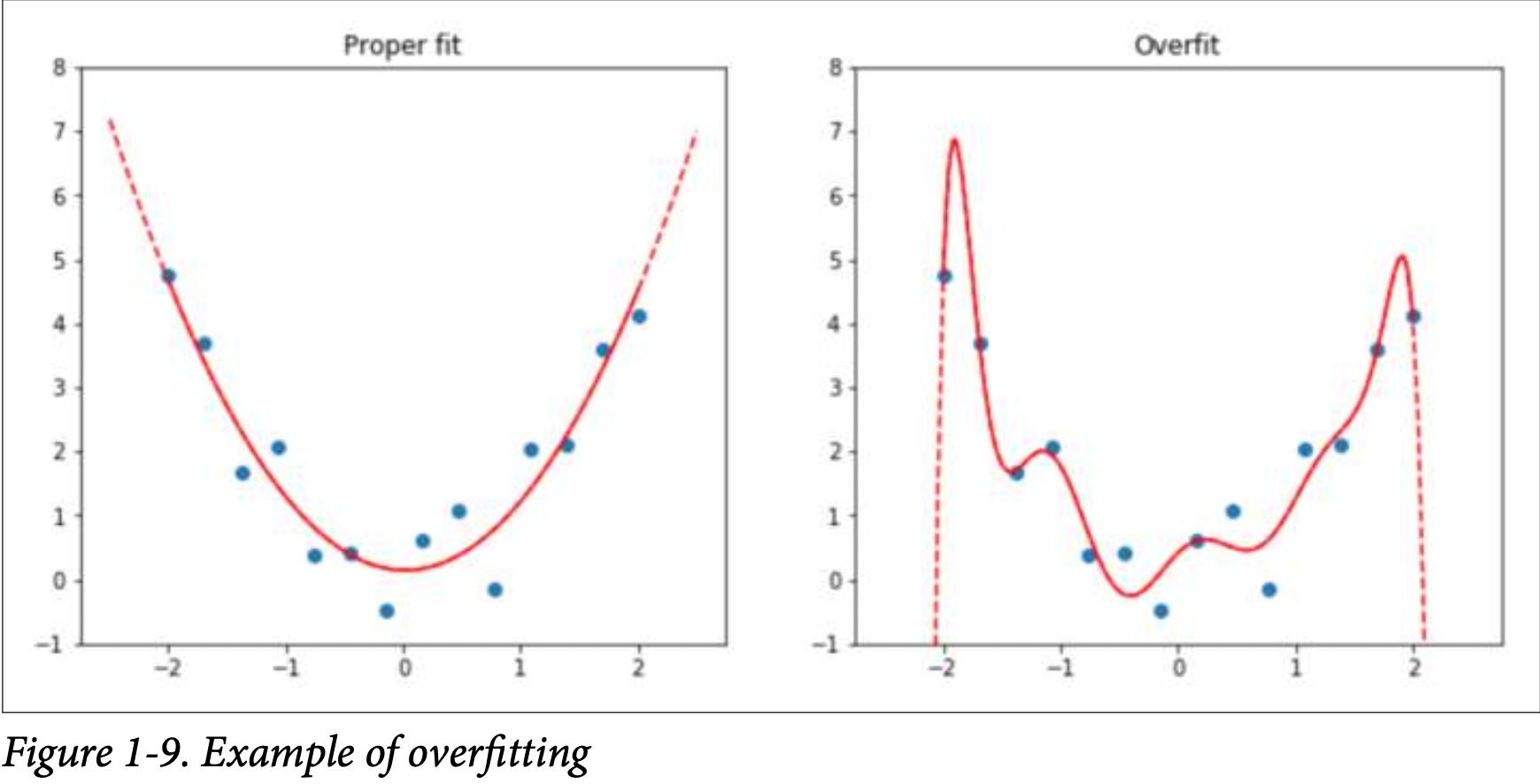
Overfitting is the single most important and challenging issue when training for all machine learning practitioners, and all algorithms.
When the model overfits, it tends to do much worse on new data and that is what we care about - how does the model do on data it hasn’t seen. There are ways to ensure that your model doesn’t overfit and those will be discussed later.
The Importance of a good dataset split - Train/Validation/Test
The previous section directly leads into this discussion of how do we understand whether our model has just memorized the data or is actually learning some pattern?
We do this by removing some of the data during training. This way the model never learns those and we can truly understand the quality of the model when we use it on the held-out data.
This held-out data comes in two flavors: validation and test. The test set is not always necessary but if possible is good to have.
The way we should see these different datasets is in a hierarchy of who sees the data.
- The
trainingdata is seen by the model as well as us. - The
validationmodel is not seen by the model BUT can still introduce some data leakage as the purpose of the validation set is often to help us optimize ourhyperparameters.These are parameters that we have to manually tweak and is not automatically learned. - The
testset is the FINAL and the most proper way of testing the model. It is not seen by the model nor us. Nothing in the test set is ever exposed to the model and therefore is the ultimate challenge for it to perform well on.
Working with data not in fast.ai library
In this section I will download images of Uranus and Neptune from the internet and use transfer learning to learn the difference between these two planets.
The basic steps we’ll take are:
- Use DuckDuckGo to search for images of “uranus photos”
- Use DuckDuckGo to search for images of “neptune photos”
- Fine-tune a pretrained neural network to recognise these two groups
- Try running this model on a picture of a neptune and see if it works.
Download the data
Function to search for images using duckduckgo_search
from duckduckgo_search import ddg_images
from fastcore.all import *

def search_images(term, max_images = 30):
    print(f"Searching for '{term}'")
    return L(ddg_images(term, max_results=max_images)).itemgot('image')
Here we write a function to search max_images number of images with the term term. ddg_images(term, max_results=max_images) returns a list of dictionaries/jsons of images and their info. One of the keys in the dictionaries is ‘image’. L() is a special list from fastcore and calling.itemgot('image') is giving us the items in the ‘images’ field.
Downloading an image and inspecting it
from fastdownload import download_url
urls = search_images('uranus', max_images=1)
dest = 'uranus.jpg'
download_url(urls[0], dest, show_progress=False)

from fastai.vision.all import *
im = Image.open(dest)
im.to_thumb(256,256)
In here we are searching for only one image of uranus. dest is where the downloaded image will be stored. Finally, download_url() function takes in three arguments here: (1) a url of the url to be donwloaded (2) the destination of where to download it (3) if we want to show progress while downloadng.
The download is successful so now we view the image.
fastai.vision.all monkey-patches the Image class from PIL to add more features to it. Here we use Image.open() to open the file and resize it with .to_thumb() into a 256 x 256 image.
We can do the same with the images of neptune.
Download multiple images of each type and store them
searches = 'uranus', 'neptune'
path = Path('uranus_or_neptune')


for term in searches:
    dest = (path/term)
    dest.mkdir(exist_ok=True, parents=True)
    download_images(dest, urls=search_images(f'{term} photo'))
    resize_images(path=path/term, max_size=400, dest=path/term)
Here we first define the things we are searching for, create a path object which will act as our root data folder.
Then for each term we are searching for, we create destination and a new subfolder from the root using dest.mkdir(exist_ok=True, parents=True). The two arguments here are important to understand.
exist_ok if True will ignore FileExistsError exception and parents being True will essentially create all the parent directories in dest if they do not already exist.
Now that we have a directory for our images, we will download them using download_images. Here the function takes in 2 arguments: (1) the destination where the images will be stored (2) the list of urls to download the images from.
Finally, we just resize the downloaded images and store them in the same path using resize_images. The first argument, path, is where we find the images to resize. Then we declare a max size for all the images and then store them in dest.
Removing corrupted images
failed = verify_images(get_image_files(path))
failed.map(Path.unlink)
len(failed)
Here we just check if any of the downloaded images in the ‘path’ are corrupted and then we ‘unlink’ them.
Create a DataLoaders
This is a VERY important step of deep learning. A lot of the times the challenge is to get our data in a form that can be easily used with pre-trained models.
A DataLoaders object is an object that contains a training set (the images used to create a model) and a validation set (the images used to check the accuracy of a model – not used during training). In fastai we can create that easily using a DataBlock, and view sample images from it:
dblk = DataBlock(
    blocks=(ImageBlock, CategoryBlock),
    get_items=get_image_files,
    splitter=RandomSplitter(valid_pct=0.2, seed=42),
    get_y=parent_label,
    item_tfms=[Resize(192, method='squish')]
)

dls = dblk.dataloaders(path, bs=32)

dls.show_batch(max_n=6)
Let’s break the DataBlock down and understand each argument.
blocks: A tuple of input and outputs. In this case the input is an image so we useImageBlockand the output is some category so we useCategoryBlock.get_items: This is how we get the inputs.get_image_filesis a fastai function that helps us grab all the image files (recursively) in one folder.splitter: splitter is a callable which, when called with items, returns a tuple of iterables representing the indices of the training and validation data.get_y: This is how you get the labels. In our case, we useparent_labelwhich label item with the parent folder name.item_tfms: This is a list of transforms applied to every single image item that we get.
The DataBlock class comes with a .dataloaders() that takes in many parameters we will discuss in the future. For now, we only care about the two parameters: (1) the data source and default Learner path (2) the batch size.
Finally every DataBlock.dataloaders() object comes with a .show_batch() function to meaningfully show a max_n number of the data in the dataloaders.
Create and train a learner
With our DataLoaders ready, we have a way to injest data. We are now ready to create a model. The fastest widely used computer vision model is resnet18. You can train this in a few minutes, even on a CPU! (On a GPU, it generally takes under 10 seconds…)
fastai comes with a helpful fine_tune() method which automatically uses best practices for fine tuning a pre-trained model, so we’ll use that.
learn = vision_learner(dls, resnet18, metrics=error_rate)
learn.fine_tune(3)
Use trained model to infer an image
Let’s now use our model to classify if an image is neptune or uranus!
img_path = "uranus.jpg"
is_neptune, _, probs = learn.predict(img_path)
print(f"This is a: {is_neptune}.")
print(f"Probability it's neptune: {probs[0]:.4f}\nProbability it's uranus:{probs[1]:.4f}")
Conclusion
This blog was a summarized version of lesson 1 and chapter 1. We talked about deep learning in abstract, a little history, and dived into using the fastai library for image classification in detail. We also looked at other applications of deep learning and finally image classification on custom data.