So far we have almost exclusively worked with the DataBlock API. While it is flexible for a lot of applications, it has its limitations. For example, the TextBlock applies both Tokenizer and Numericalize to raw text data. However, what if we already had tokenized texts or wanted to see what each step does? To achieve more flexibility we will now go deeper into the fastai’s layered API.
Going Deeper into fastai’s Layered API
The fastai library is layered: at the highest level are the application level DataLoaders like TextDataLoaders.from_folder that work only when your data is arranged in a very specific way (like the IMDB dataset to be specific for this case).
We then have the high level, but still pretty flexible, DataBlock API. While it is flexible, a lot of the time it abstracts away too much and therefore can either be difficult to understand (although DataBlock.summary() can be helpful) or is just not flexible enough for an application that isn’t directly supported by fastai i.e. there is no block for it in the library.
In those cases we need to dig a little deeper into the mid-level API and that is exactly what the blog is about.
Transforms
We have been using Transforms for a while now without knowing or calling them Transforms.
When we studied tokenization and numericalization in the preceding chapter, we started by grabbing a bunch of texts:
files = get_text_files(path, folders = ['train', 'test'])
txts = L(o.open().read() for o in files[:2000])
Once we had the texts we tokenized them and then numericalized them while automatically creating a vocab.
Both Tokenizer and Numericalize class objects also allow us to decode the step. Tokenizer let us put the strings back together (they may not be the same as the original though) and Numericalize gave us back the actual tokens.
Let’s remind ourselves what the code for these steps look like and keep an eye for repeated behavior:
tok = Tokenizer.from_folder(path)
tok.setup(txts) # setting up the tokenizer
toks = txts.map(tok) # using the setup tokenizer
print(toks[0])
toks_dec = tok.decode(toks[0]
print(toks_dec)
num = Numericalize()
num.setup(toks) # setting up the numericalizer using the tokens
nums = toks.map(num)
print(nums[0][:10])
nums_dec = num.decode(nums[0][:10]);
print(nums_dec)The decode method is important in giving human readable outputs. fastai’s show_batch and show_results, as well as some other inference methods use them to convert predictions and mini-batches into a human-understandable representation.
For each of tok or num in the preceding examples, we created an object called the setup method (which trains the tokenizer if needed for tok and creates the vocab for num), applied it to our raw texts (by calling the object as a function), and then finally decoded the result back to an understandable representation. These steps are needed for most data preprocessing tasks, so fastai provides a class that encapsulates them. This is the Transform class. Both Tokenize and Numericalize are Transforms.
A Transform is an object that behaves like a function and has an optional setup method that will initialize an inner state (like the vocab inside num) and an optional decode method that will reverse the function.
Transforms always get applied over tuples. In general, our data is always a tuple (input, target). When applying a transform on an item like this, such as Resize, we don’t want to resize the tuple as a whole; instead, we want to resize the input (if applicable) and the target (if applicable) separately.
We can see this behavior very easily:
tok((txts[0], txts[1]))Writing your own Transforms
There are three (or technically two) ways to write a custom transform:
Using functions
If you want to write a custom transform to apply to your data, the easiest way is to write a function. However, one not-very-pythonic feature of a Transform is that it is type-dispatched i.e. it will only be applied to a matching type if a type is provided.
def f(x: int): return x + 1
tfm = Transform(f)
print(tfm(2)) # prints 3
print(tfm(2.)) # prints 2
Here, f is converted to a Transform with no setup and no decode method.
Using decorators
If you know Python, you’ve probably heard of decorators before. A decorator is something that takes another function (or class) as an argument and modifies its behavior. In this case, that’s exactly what Transform is doing. So we can also write a Transform function using the @Transform decorator.
@Transform
def f(x: int): return x + 1

print(f(2), f(2.))
Using inheritence
The previous two methods don’t add the setup or decode optional methods. To do that we need to inherit the Transform class and override those method definitions for our case.
class NormalizeMean(Transform):
  def setups(self, items):
    "Initializes a certain state"
    self.mean = sum(items)/len(items)

  def encodes(self, x):
    "Applies the transformation"
    return x-self.mean

  def decodes(self, x):
    "Applies the inverse of the transformation"
    return x+self.mean
There is something very important when it comes to using these Transform methods: during calling, the function names are different. If you noticed, during the Numericalize or Tokenizer examples we called them setup and decode and we never really had to call encode. Here’s a table to summarize the differences (it’s obvious but still good to have reference):
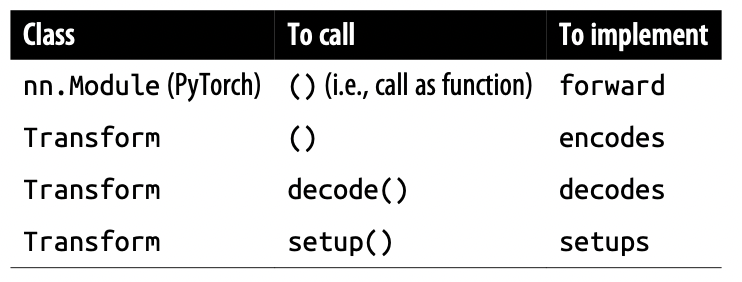
The differences are because some extra work is done by the call methods before and after the implemented methods are called for you i.e. setup does some work before and after calling setups for you.
Transforms are tricky but very powerful. It is worthwhile to learn more about them in docs through the tutorials!
Pipeline
In the most simplest way possible, Pipeline allows you to compose different Transforms. We define a Pipeline by passing it a list of Transforms and when a Pipeline is called on an object, all the transformations are automatically applied.
tfms = Pipeline([tok, num])
t = tfms(txts[0]); t[:20]
You can also just call decode and it will just like a Transform give you something human-readable:
tfms.decode(t)[:100]So, encode and decode work the same as just applying different Transforms one after another. The only part that doesn’t work the same way as in Transform is the setup call. For that we have a class called TfmdLists.
TfmdLists and Datasets: Transformed Collections
To properly set up a Pipeline of Transforms on some data, you need to use a TfmdLists.
Your data is almost always a set of raw items - filenames, rows in a DataFrame, etc. You then apply a succession of transformations to it (we will call these type transforms).
The way we do that is using Pipeline and the class that groups this Pipeline with the raw data is the TfmdLists class.
TfmdLists
As said above, a TfmdLists class groups a Pipeline of Transform with the raw data that the Transforms will be applied to.
tls = TfmdLists(files, [Tokenizer.from_folder(path), Numericalize])The TfmdList will call setup method of each Transform in the Pipeline and pass not the raw inputs but the encoded outputs of the previous Transform. The encode and decode methods still work the same way of course.
To get the result of our Pipeline on a raw element we just index into the TfmdLists object.
t = tls[0] # result of the `Pipeline` on the first raw data
t[:20] # first 20 tokens
In addition to just the decode method, a TfmdLists object also has a show method.
# decode the encoded example, t
tls.decode(t)[:100]tls.show(t)One thing you might have noticed by now, most things in fastai that end with a “s” is because it handles the training and validation set using a splits argument. This is true for TfmdLists as well.
cut = int(len(files)*0.8)
splits = [list(range(cut)), list(range(cut,len(files)))]

tls = TfmdLists(files, [Tokenizer.from_folder(path), Numericalize],
splits=splits)
# results of the pipeline on the first raw input in the validation set
tls.valid[0][:20]
If you have manually written a Transform that performs all of your preprocessing at once, turning raw items into a tuple with inputs and targets, then TfmdLists is the class you need. You can directly convert it to a DataLoaders object with the dataloaders method.
In general you will have two parallel pipelines of transforms: one to convert raw data to inputs and another to convert raw data to targets.
Let’s say we want to do text classification on whether a review is positive or negative.
We already have our inputs using the Tokenizer and Numericalize TfmdLists of Pipeline. We now need to do something similar for our targets.
It will go something like this: get the raw labels -> turn it into a category (a number) and have some sort of a human-readable format (a vocab). Once we do this manually, we will just use a TfmdLists to redo it more elegantly.
# get the labels from the filenames
lbls = files.map(parent_label)

# a Transform
cat = Categorize()
cat.setup(lbls)
cats = cat(lbls[:10])
cat.vocab, cats
We can simply do this using a TfmdLists ofcourse.
tls_y = TfmdLists(files, Pipeline([parent_label, Categorize()]))
tls_y[:10]
This is not really the most element. What if we had some way of providing a list of lists which we could apply to the raw items to get the inputs and targets at the same time instead of creating two separate objects? We have Datasets for that.
Datasets
Datasets will apply two (or more) pipelines in parallel to the same raw object and build a tuple with the result. Like TfmdLists, it will automatically do the setup for us, and when we index into a Datasets, it will return us a tuple with the results of each pipeline.
And again, Datasets ends with a “s” so we know it should also take a splits argument to split into training and validation sets.
# same splits as before
cut = int(len(files)*0.8)
splits = [list(range(cut)), list(range(cut,len(files)))]

x_tfms = [Tokenizer.from_folder(path), Numericalize]
y_tfms = [parent_label, Categorize()]
dsets = Datasets(files, [x_tfms, y_tfms], splits = splits)
x, y = dsets.valid[0]
x[:20], y
It can also decode any processed tuple or show it directly as well:
# returns a tuple of results from each pipeline being applied to the raw data
t = dsets.valid[0]

# decode it back
dsets.decode(t)
Finally, the only thing left is to convert it into a DataLoaders object. We do that using the dataloaders method. dataloaders directly calls DataLoader on each subset of our Datasets. fastai’s DataLoader expands the PyTorch class of the same name and is responsible for collating the items from our datasets into batches.
The method (and the DataLoaders class) takes in a few arguments that are very important to know about. Let’s look at them.
after_item: Applied on each item after grabbing it inside the dataset. This is the equivalent ofitem_tfmsinDataBlock.before_batch: Applied on the list of items before they are collated. This is the ideal place to pad items to the same size.after_batch: Applied on the batch as a whole after its construction. This is the equivalent ofbatch_tfmsinDataBlock.
Before moving on to some real usage of these concepts, let’s look at a full block of code that compares using the DataBlock API vs the Datasets method with Transform and everything we have learnt so far.
tfms = [[Tokenizer.from_folder(path), Numericalize], [parent_label, Categorize]]
files = get_text_files(path, folders = ['train', 'test'])
splits = GrandparentSplitter(valid_name='test')(files)
dsets = Datasets(files, tfms, splits=splits)
dls = dsets.dataloaders(dl_type=SortedDL, before_batch=pad_input)
The two differences from the previous code are the use of GrandparentSplitter to split our training and validation data, and the dl_type argument. This is to tell dataloaders to use the SortedDL class of DataLoader, and not the usual one.
SortedDL constructs batches by putting samples of roughly the same lengths into batches.
This does the exact same thing as our previous DataBlock:
    path = untar_data(URLs.IMDB)
    dls = DataBlock(
        blocks=(TextBlock.from_folder(path),CategoryBlock),
        get_y = parent_label,
        get_items=partial(get_text_files, folders=['train', 'test']),
        splitter=GrandparentSplitter(valid_name='test')
).dataloaders(path)
Let’s look at some examples now!
Applying the Mid-Level Data API
Text
We have already been looking at how to use the Mid-Level API for text classification. Let’s just recreate what we have seen so far.
from fastai.text.all import *

# get data and path
path = untar_data(URLs.IMDB)

## raw files
files = get_text_files(path, folders=["train", "test"])

# type tfms (for Datasets)
type_tfms = [
  [Tokenizer.from_folder(path), Numericalize],
  [parent_label, Categorize()]
]

# splitter
splitter = GrandparentSplitter(valid_name="test")
splits = splitter(files)

## item/batch tfms
before_batch_tfms = pad_input

## dsets
dsets = Datasets(
  files,
  type_tfms,
  splits=splits)

## dls
dls = dsets.dataloaders(dl_type = SortedDL, before = before_batch_tfms)
dls.show_batch()

## learner
learn = text_classifier_learner(dls, AWD_LSTM, metric=[error_rate])
lr = learn.lr_find()
learn.fit_one_cycle(4, lr)

learn.show_results()
Multilabel Image Classification
Let’s use the PLANETS dataset for this! It contains satellite images with multiple labels per image.
from fastai.vision.all import *

path = untar_data(URLs.PLANET_SAMPLE)
df = pd.read_csv(src/'labels.csv')
Each row in the dataframe is a path to an image and a space separated list of labels.
Additionally the dataset is known to be unbalanced. Let’s take a look.
all_tags = df["tags"].values
all_labels = []
for row in all_tags:
    all_labels += row.split(" ")
unique_labels = set(all_labels)

counts = {
    label: all_labels.count(label)
    for label in unique_labels
}

counts = {
    key: value
    for key, value in
    sorted(
        counts.items(),
        key = lambda item: item[1],
        reverse=True
    )
}
The ideal thing to do would be to oversample the labels with very few examples. However, to keep things simple, we will just remove them. So let’s go through our DataFrame and only keep the rows without those labels in them.
for key, count in counts.items():
    if count < 10:
        df = df[df["tags"].str.contains(key) == False]
Now that we have preprocessed some of the data, let’s get to building our Datasets.
def get_x(row:pd.Series) -> Path:
    return (src/'train'/row.image_name).with_suffix(".jpg")
def get_y(row:pd.Series) -> List[str]:
    return row.tags.split(" ")

# alternatively could use ColReader
get_x = ColReader(0, pref='{src}/train/', suff='.jpg')
get_y = ColReader(1, label_delim=" ")

# type_tfms
type_tfms = [
    [get_x, PILImage.create],
    [
      get_y,
      MultiCategorize(vocab=different_labels),
      OneHotEncode(len(different_labels))
    ]
]

# splits
train_idxs, valid_idxs = (
    RandomSplitter(valid_pct=0.2, seed=42)(df)
)

# datasets
dsets = Datasets(
  df,
  tfms=type_tfms,
  splits=[train_idxs, valid_idxs]
)

show_at(dsets.train, 0)
Two important things here are the type transforms for the labels. Once we get the label names we have to convert them into numbers using our unique_labels vocabulary. It simply just maps the labels to indices. Additionally, we have to one-hot encode our indices for multilabel classification.
Onto the DataLoaders:
# item/batch tfms

item_tfms = [ToTensor()]
batch_tfms = [
    IntToFloatTensor(),
    *aug_transforms(
        flip_vert=True,
        max_lighting=0.1,
        max_zoom=1.05,
        max_warp=0.
    ),
    Normalize.from_stats(*imagenet_stats)
]


# dataloaders
dls = dsets.dataloaders(
  after_item = item_tfms,
  after_batch = batch_tfms
)
dls.show_batch()
Now all we need to do is build a learner, train, and see the results.
learn = vision_learner(dls, resnet34, metrics=[accuracy_multi])
learn.fit_one_cycle(1, slice(2e-3))
learn.unfreeze()
learn.fit_one_cycle(5, slice(2e-3/2.6**4, 2e-3))
learn.show_results(figsize=(15,15))
A few key things to understand here are:
accuracy_multi: We cannot use regular accuracy. This is a special accuracy metric for multilabel classification that depends on some threshold.loss function: The default multilabel classification loss function for a
vision_learnerisFlattenedLoss of BCEWithLogitsLoss().thresholds:
learn.loss_func.threshwill show you the threshold. If you decide to change the loss function’s threshold YOU MUST make sure to change the metric’s threshold as well.
Let’s move on to a much more custom problem: the Siamese Pair.
Siamese Pair
A Siamese model takes two images and has to determine whether they are of the same class.
Let’s use the PETs dataset for this example and prepare the data for a model that will have to predict whether two images of pets are of the same breed.
from fastai.vision.all import *
path = untar_data(URLs.PETS)
files = get_image_files(path/"images")
Our goal is to (1) Create a custom type so we can look at/display the images (2) Create a transform that completely preprocesses the raw files.
Remember that calling show on a TfmdLists or Datasets object will decode items until it reaches a type that contains a show method.
So, in order to achieve (1) we need to create a custom SiameseImage type that implements a special show method.
The method should take in some context, ctx as a parameter which can be a matplotlib Axes object or a row in a DataFrame for texts. The SiameseImage class subclasses Tuple and is intended to contain three things: two images, and a Boolean that’s True if the images are of the same breed. The special show method concatenates the two images with a black line in the middle.
class SiameseImage(Tuple):
  def show(self, ctx=None, **kwargs):
    # unpack the objects given to the tuple
    img1, img2, same_breed = self
    if not isinstance(img1, Tensor):
      if img2.size != img1.size:
        img2 = img2.resize(img1.size)
        t1,t2 = tensor(img1),tensor(img2)
        # converts to channel first order of dims
        t1,t2 = t1.permute(2,0,1),t2.permute(2,0,1)
    else:
      t1, t2 = img1, img2

    # creates a black line
    line = t1.new_zeros(t1.shape[0], t1.shape[1], 10)

    return show_image(torch.cat([t1, line, t2]), dim=2,
    title = same_breed, ctx=ctx)


img1 = PILImage.create(files[0])
img2 = PILImage.create(files[1])
s = SiameseImage(img1, img2, False)
s.show()
Looks like it works. One important thing to ask is why did we subclass Tuple? If you remember, Transforms work on tuples or their subclasses. If we apply some sort of an image augmentation, it will get applied over both the images now but not the Boolean because of the type dispatch system we had seen.
s2 = Resize(224)(s)
s2.show()
Next up is the Transform to get our data ready for a Siamese model. First let’s write a function to find the label of an image. We have done this before as well:
def label_func(fname):
  return re.match(r"^(.*)_\d+.jpg$", fname.name).groups[0]
This is what our custom Transform will do:
For each image, our transform will, with a probability of 0.5, draw an image from the same class and return a SiameseImage with a true label, or draw an image from another class and return a SiameseImage with a false label. This is done in the
_drawfunction.
Our transforms will also be different for training and validation sets so** we need to initialize them with the splits**. The difference is that on the training set, we will make that random pick each time we read an image, whereas on the valida‐ tion set, we make this random pick once and for all at initialization. This ensures more variability during training and always the same validation set.
class SiameseTransform(Transform):
  def __init__(self, files, label_func, splits):
    self.labels = files.map(label_func).unique()
    self.lbl2files = {

    }
    self.label_func = label_func
    # get the validation set on initialization as said above
    self.valid = {f: self._draw(f) for f in files[splits[1]]}

  def encodes(self, f):
    f2, t = self.valid.get(f, self._draw(f))
    img1, img2 = PILImage.create(f), PILImage.create(f2)
    return SiameseImage(img1, img2, t)

  def _draw(self, f):
    same = random.random() < 0.5
    cls = self.label_func(f)
    if not same:
      cls = random.choice(L(l for l in self.labels if l != cls))
    return random.choice(self.lbl2files[cls]), same
We can then create our main transform:
splits = RandomSplitter()(files)
tfm = SiameseTransform(files, label_func, splits)
tfm(files[0]).show();
We have a choice between TfmdLists and Datasets when it comes to applying transforms to raw files. Datasets applies several Pipelines of transforms in parallel to create (x, y) tuples while TfmdLists will apply a single Pipeline of transforms. In our case, our transforms already return a tuple so we just use TfmdLists.
tls = TfmdLists(files, tfm, splits=splits)
show_at(tls.valid, 0);
All we have to do now is create our DataLoaders and train.
dls = tls.dataloaders(
  after_item = [Resize(224), ToTensor],
  after_batch = [IntToFloatTensor, Normalize.from_stats(*imagenet_stats)]
)
That’s it for our data. Create a learner for this is a little more custom than just a cnn_learner. That is covered in a different chapter.
Conclusion
This blog was dedicated to the powerful mid-level API. The fastai docs contain more detailed end-to-end examples of using the mid-level API for advanced custom problems. While the DataBlock API is amazing, the mid-level API allows a lot more flexibility and control over exactly what kinds of transforms you want to apply to your raw files to build DataLoaders. In the real-world problems, this is probably what is the most useful and a big step to working on novel problems.