!pip install -Uq diffusers transformers fastcoreImports
import logging
from pathlib import Path

import matplotlib.pyplot as plt
import torch
from diffusers import StableDiffusionPipeline
from fastcore.all import concat
from huggingface_hub import notebook_login
from PIL import Image

logging.disable(logging.WARNING)

torch.manual_seed(1)
if not (Path.home()/'.cache/huggingface'/'token').exists(): notebook_login()
/opt/conda/lib/python3.10/site-packages/scipy/__init__.py:146: UserWarning: A NumPy version >=1.16.5 and <1.23.0 is required for this version of SciPy (detected version 1.23.5
warnings.warn(f"A NumPy version >={np_minversion} and <{np_maxversion}"
/opt/conda/lib/python3.10/site-packages/tensorflow_io/python/ops/__init__.py:98: UserWarning: unable to load libtensorflow_io_plugins.so: unable to open file: libtensorflow_io_plugins.so, from paths: ['/opt/conda/lib/python3.10/site-packages/tensorflow_io/python/ops/libtensorflow_io_plugins.so']
caused by: ['/opt/conda/lib/python3.10/site-packages/tensorflow_io/python/ops/libtensorflow_io_plugins.so: undefined symbol: _ZN3tsl6StatusC1EN10tensorflow5error4CodeESt17basic_string_viewIcSt11char_traitsIcEENS_14SourceLocationE']
warnings.warn(f"unable to load libtensorflow_io_plugins.so: {e}")
/opt/conda/lib/python3.10/site-packages/tensorflow_io/python/ops/__init__.py:104: UserWarning: file system plugins are not loaded: unable to open file: libtensorflow_io.so, from paths: ['/opt/conda/lib/python3.10/site-packages/tensorflow_io/python/ops/libtensorflow_io.so']
caused by: ['/opt/conda/lib/python3.10/site-packages/tensorflow_io/python/ops/libtensorflow_io.so: undefined symbol: _ZTVN10tensorflow13GcsFileSystemE']
warnings.warn(f"file system plugins are not loaded: {e}")Using Stable Diffusion Pipelines from Hugginface Diffusers
Basic SD
The most basic pipeline is just StableDiffusionPipeline.from_pretrained and you give it the model name you want to load from hf hub as the first argument. The other arguments are passed to make things a little faster and also explicitly state the data type.
pipe = StableDiffusionPipeline.from_pretrained("CompVis/stable-diffusion-v1-4", revision="fp16", torch_dtype=torch.float16).to("cuda")/opt/conda/lib/python3.10/site-packages/transformers/models/clip/feature_extraction_clip.py:28: FutureWarning: The class CLIPFeatureExtractor is deprecated and will be removed in version 5 of Transformers. Please use CLIPImageProcessor instead.
warnings.warn(!ls ~/.cache/huggingface/hubmodels--CompVis--stable-diffusion-v1-4 version_diffusers_cache.txt
version.txtNow all you have to do is give the pipe a prompt
prompt = "A man riding a duck"
pipe(prompt).images[0]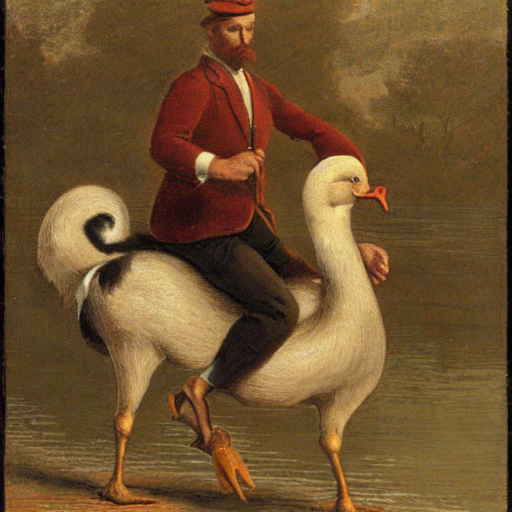
If you ran the above cell, you’ll notice it runs 50 times. That is the number of inference steps i.e. the number of steps it takes to go from the initial point to our image. We can control that by passing in the argument num_inference_steps to pipe
pipe(prompt, num_inference_steps=10).images[0]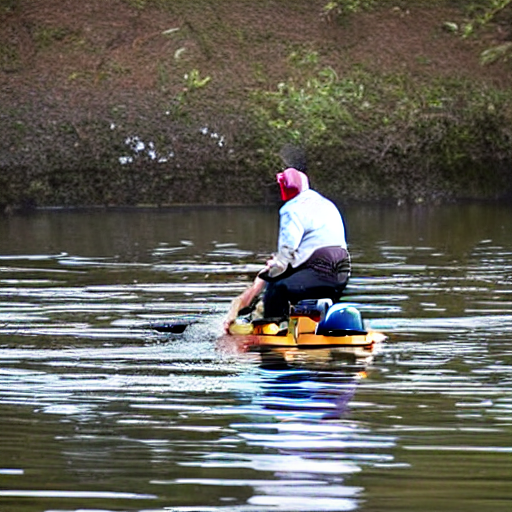
pipe(prompt, num_inference_steps=5).images[0]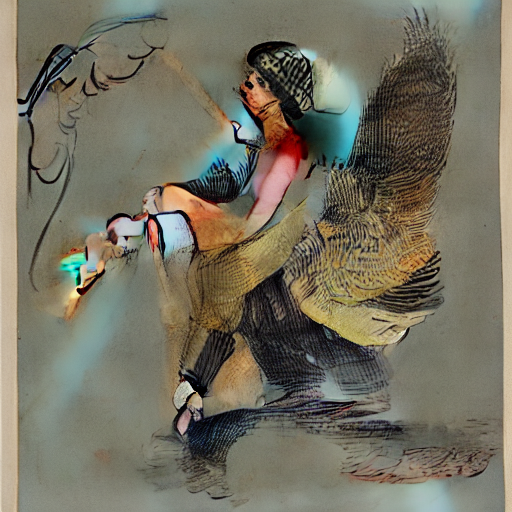
Classifier-Free guidance
Classifier-Free Guidance is a technique that makes the generated image lean more towards the prompt. The higher the guidance the closer in principle it should be to what the text wants.
We can pass the guidance_scale value to pipe
pipe(prompt, guidance_scale=9).images[0]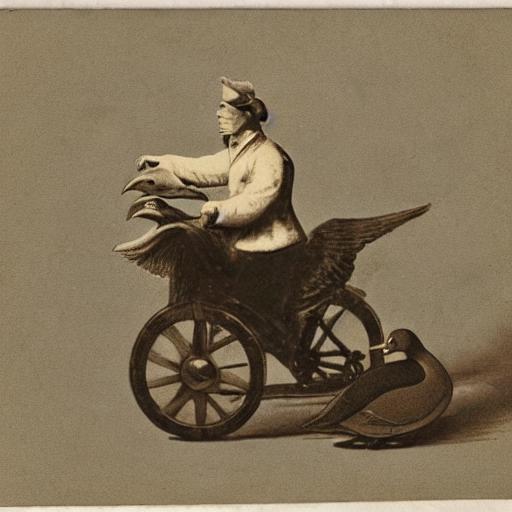
Let’s generate a bunch of images for the same prompt using difference guidance_scale and plot them in a grid.
def image_grid(imgs, rows, cols):
    w, h = imgs[0].size
    grid = Image.new("RGB", size=(cols*w, rows*h))
    for i, img in enumerate(imgs):
        grid.paste(img, box=(i%cols*w, i//cols*h))
    return grid

num_rows,num_cols = 4,4
prompts = [prompt] * num_cols

images = concat(pipe(prompts, guidance_scale=g).images for g in [1.1,3,7,14])
image_grid(images, num_rows,num_cols)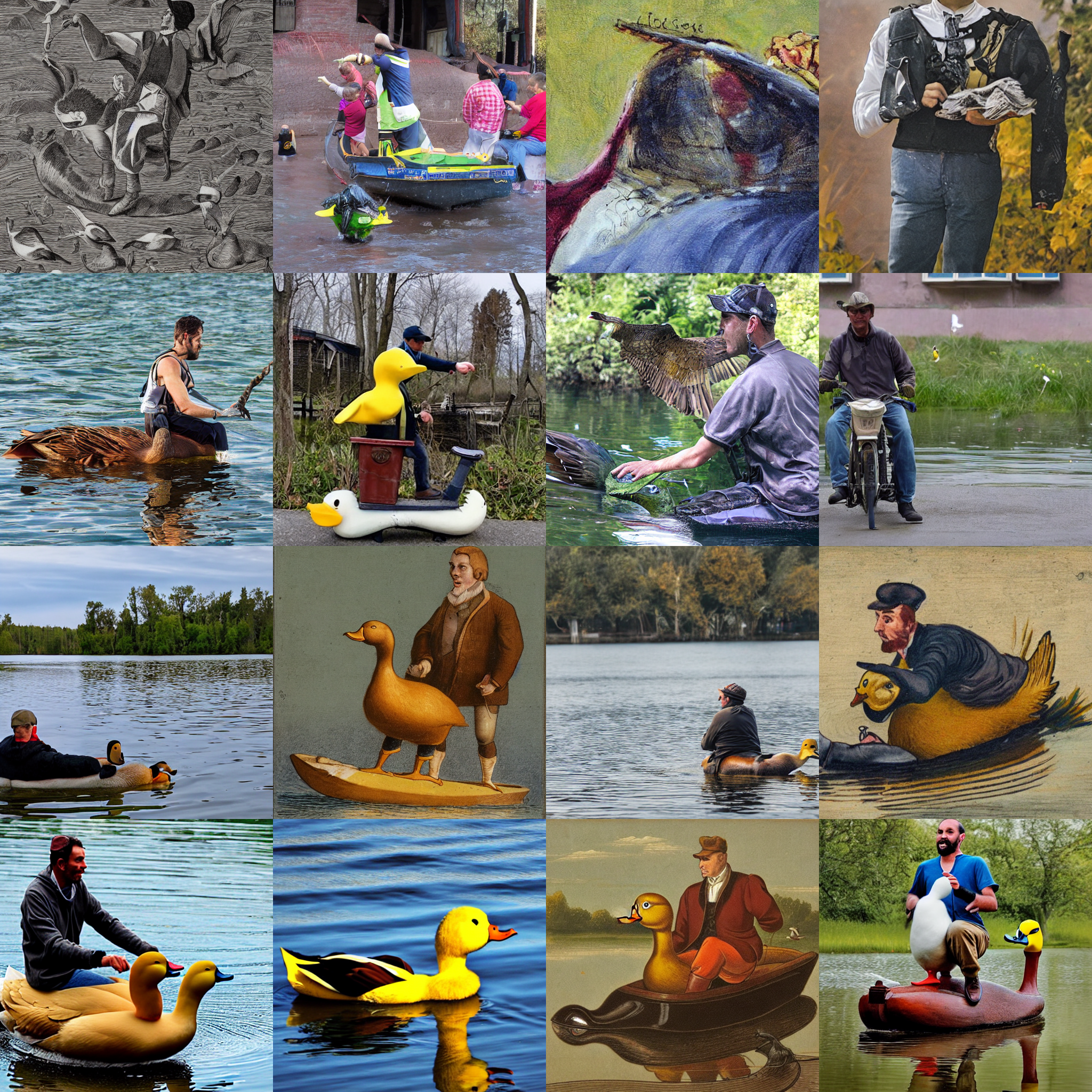
Negative Prompting
Usually when we generate these images we have an unconditional prompt (empty string). When we use negative prompting we use a “negative prompt” instead of an empty string. By using the negative prompt we move more towards the direction of the positive prompt, effectively reducing the importance of the negative prompt in our composition.
torch.manual_seed(1000)
prompt = "Labrador in the style of Vermeer"
pipe(prompt).images[0]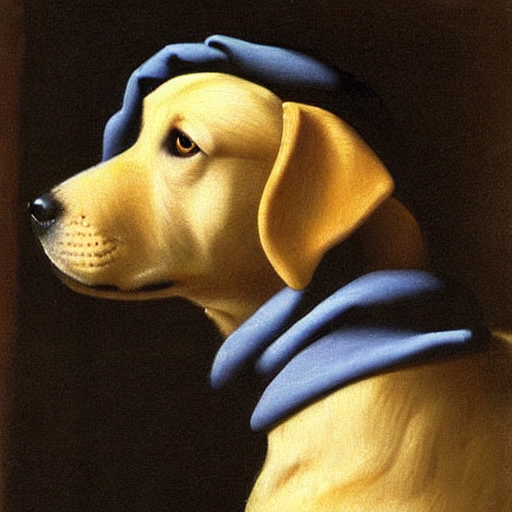
torch.manual_seed(1000)
pipe(prompt, negative_prompt="blue").images[0]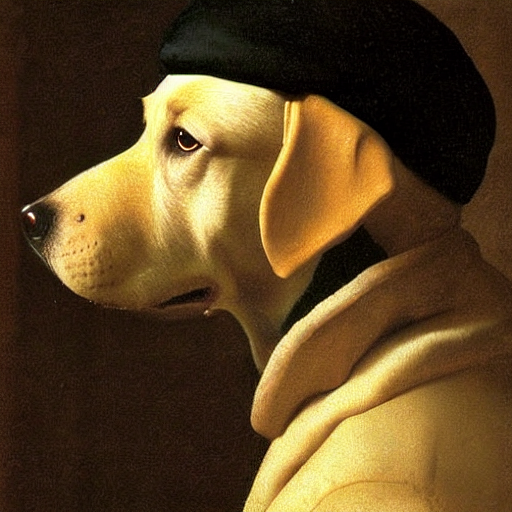
Image2Image
We have not talked about the innards of SD but all diffusion models will generally start with random noise. Image2Image is when you instead start the diffusion process from a given image
from diffusers import StableDiffusionImg2ImgPipeline

pipe = StableDiffusionImg2ImgPipeline.from_pretrained(
    "CompVis/stable-diffusion-v1-4",
    revision="fp16",
    torch_dtype=torch.float16,
).to("cuda")
Let’s download an image and see it in action
from fastdownload import FastDownload
p = FastDownload().download('https://cdn.pixabay.com/photo/2015/02/24/15/41/wolf-647528_1280.jpg')
init_image = Image.open(p).convert("RGB")
init_image
102.88% [245760/238889 00:00<00:00]
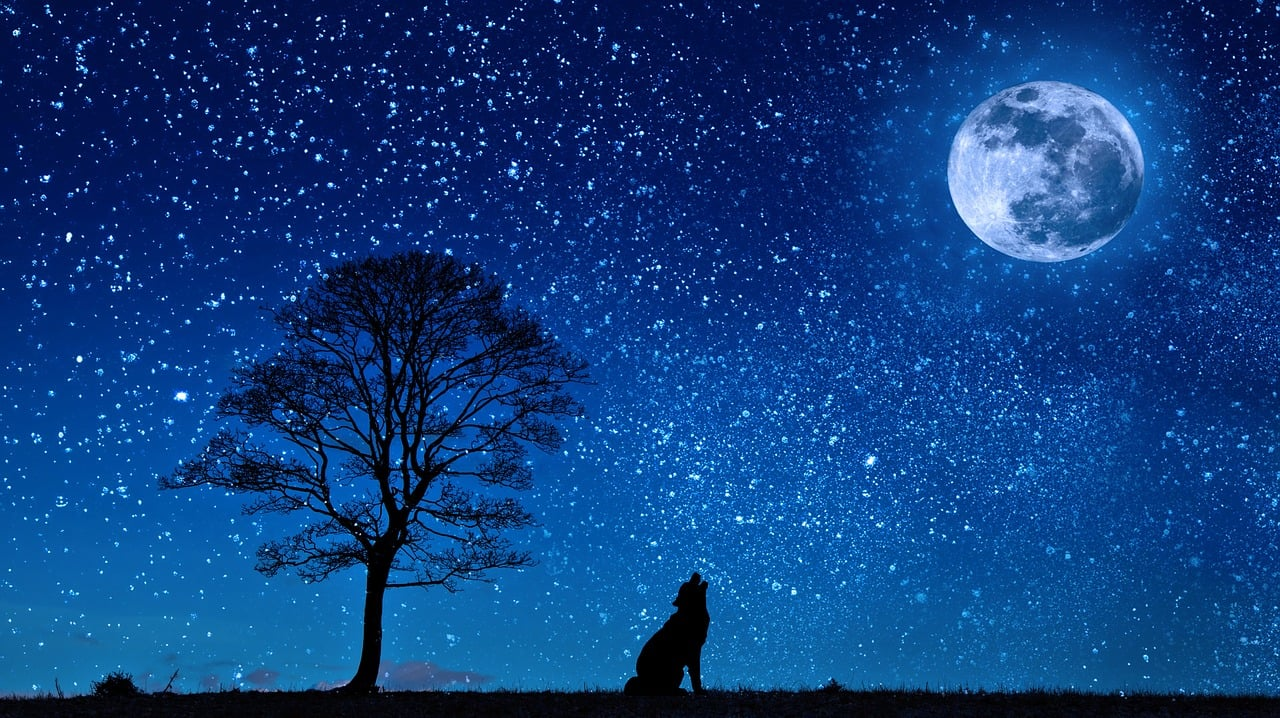
torch.manual_seed(1000)
prompt = "Wolf howling at the moon, photorealistic 4K"
images = pipe(prompt=prompt, num_images_per_prompt=3, image=init_image, strength=0.8, num_inference_steps=50).images
image_grid(images, rows=1, cols=3)
/opt/conda/lib/python3.10/site-packages/diffusers/pipelines/stable_diffusion/pipeline_stable_diffusion_img2img.py:545: FutureWarning: You have passed 3 text prompts (`prompt`), but only 1 initial images (`image`). Initial images are now duplicating to match the number of text prompts. Note that this behavior is deprecated and will be removed in a version 1.0.0. Please make sure to update your script to pass as many initial images as text prompts to suppress this warning.
deprecate("len(prompt) != len(image)", "1.0.0", deprecation_message, standard_warn=False)
torch.manual_seed(1000)
prompt = "Wolf howling at the moon, Van Gogh style"
images = pipe(prompt, num_images_per_prompt=3, num_inference_steps=30, image=init_image, strength=0.8).images
image_grid(images, 1, 3)
Textual Inversion
This is a technique where you “teach” a new word to the text model and train its embeddings close to some visual representation. It is done by adding a new token to the vocabulary, freezing the weights of the rest of the model except the text encoder and training with a few representative images
pipe = StableDiffusionPipeline.from_pretrained("runwayml/stable-diffusion-v1-5", revision="fp16", torch_dtype=torch.float16).to("cuda")Let’s get some new embeddings from a url
embeds_url = "https://huggingface.co/sd-concepts-library/indian-watercolor-portraits/resolve/main/learned_embeds.bin"
embeds_path = FastDownload().download(embeds_url)
embeds_dict = torch.load(str(embeds_path), map_location="cpu")
embeds_dict
214.51% [8192/3819 00:00<00:00]
{'<watercolor-portrait>': tensor([-7.5809e-01,  9.1353e-01,  3.2849e-01,  1.8717e-01,  1.1011e+00,
         -1.1042e+00,  6.7323e-01, -8.1787e-01,  1.7773e+00, -7.0858e-01,
          4.7547e-01,  1.2370e-01,  5.6963e-01,  1.2419e+00, -8.4267e-01,
         -1.9352e-01,  8.2211e-01, -1.1030e+00,  1.6077e-01, -1.5768e+00,
          4.6116e-02, -2.5767e-02, -5.5363e-01, -2.5122e-01,  6.0471e-01,
         -9.2971e-01,  9.4904e-01,  1.6257e-01, -7.0222e-01, -3.6808e-01,
         -4.3799e-01, -4.2864e-01,  1.3660e-01,  1.9899e-01,  1.6418e+00,
          3.8705e-02, -8.0869e-01,  1.0367e+00,  4.0529e-01, -1.6930e-01,
         -4.8465e-01,  2.6351e-01, -2.8817e-01, -1.3775e+00,  1.7138e-01,
         -8.4959e-01,  1.9103e+00, -4.0033e-01, -1.9069e-01,  1.0317e+00,
         -5.7735e-01, -7.5856e-01,  4.4601e-01, -7.1885e-01, -1.7878e-01,
         -1.1115e+00,  6.6382e-01,  6.7461e-01,  3.4806e-01,  2.6074e-01,
         -6.6260e-01,  1.9259e-01,  2.0164e-01, -1.6512e-01, -7.7343e-01,
         -2.6740e-01,  4.9109e-02,  6.7716e-01, -1.1413e+00, -1.0291e+00,
          1.1541e+00,  1.4539e+00, -1.5302e-01,  2.5852e-01, -1.2932e+00,
          5.5703e-02, -1.2957e+00,  1.8322e+00,  2.7124e-02,  6.2271e-01,
         -6.9005e-01, -9.1069e-01, -5.3495e-02,  4.2614e-01, -4.8017e-01,
          8.3706e-02,  8.8025e-01,  3.0668e-01,  7.9309e-02,  4.1285e-02,
          3.5665e-01, -7.0522e-01, -1.6251e-01, -5.8549e-01, -6.7856e-02,
          7.1914e-01,  2.4385e-02, -4.4794e-01,  1.1555e+00, -2.1122e-01,
         -5.5233e-01, -1.2750e-01, -6.4820e-01,  1.0336e+00, -7.7489e-01,
          5.8890e-01, -1.8980e-02,  3.5973e-01, -8.1419e-01, -1.6900e-01,
          8.0779e-01, -6.2918e-01,  4.3556e-01,  9.5738e-01, -9.3571e-02,
         -8.5920e-01, -7.8611e-01, -4.5012e-01,  3.7493e-01,  2.0515e-01,
         -8.4454e-02, -2.2360e-01, -3.1317e-01,  2.3479e-01, -6.2252e-02,
          2.7315e-01, -3.0404e-02,  4.8589e-01,  3.6292e-01,  1.0133e+00,
         -4.9824e-01, -2.4709e-01,  9.0230e-01,  5.8649e-01,  1.4110e-01,
         -2.2853e-02,  1.1911e+00, -8.2644e-01, -2.6787e-01, -7.5727e-01,
          3.3232e-01,  1.3496e+00,  7.1738e-01,  6.5712e-01,  9.6970e-01,
         -6.1373e-01,  1.0590e-01,  1.2670e+00,  1.7549e+00, -6.3328e-01,
          3.4269e-01, -1.0147e+00,  2.0883e-01,  6.7459e-01, -2.4327e+00,
          3.7604e-01, -5.0892e-01, -3.5668e-01,  8.5644e-01,  1.1455e+00,
          1.4930e-01, -7.6786e-01,  4.1584e-01, -4.3249e-01,  1.4483e+00,
          2.0104e-01,  3.8953e-01, -1.1355e+00,  8.5407e-01,  6.4187e-01,
          5.4219e-01,  1.1885e+00,  3.1510e-01, -1.0906e+00,  7.5536e-01,
          6.0937e-01,  4.3670e-03,  7.2295e-01,  4.9478e-01,  1.5054e-01,
         -7.7763e-01, -6.2273e-02,  4.8464e-01,  5.5000e-01, -1.7188e-01,
          1.0564e-01,  1.8886e-01,  1.0575e+00, -1.3392e+00, -5.9050e-01,
         -1.4191e+00, -6.7809e-01, -4.6942e-01,  2.3051e-01, -2.4133e-01,
         -3.8602e-01, -8.5643e-01,  4.8133e-01,  2.5325e+00, -7.2865e-01,
         -8.0797e-01,  3.1622e-01,  2.3808e-02, -3.3355e-01,  2.4727e-01,
         -5.3129e-02,  3.6786e-01,  7.8118e-01,  6.9562e-01, -1.1038e-03,
          1.1532e+00,  5.3088e-02, -5.5936e-01, -1.3782e+00, -2.6617e-01,
          5.1413e-01,  7.0013e-01,  1.8690e-01, -7.8381e-02, -1.6907e-01,
         -2.1400e-01, -7.5385e-01, -5.8512e-01, -5.2425e-01, -4.2563e-01,
          8.4750e-01, -3.3374e-01, -5.5723e-01,  3.6311e-01, -5.6884e-01,
         -4.6273e-02, -1.4242e+00, -4.4358e-01,  3.7240e-02, -4.7194e-01,
         -1.3011e-02, -1.4795e-01,  8.9529e-02,  1.0896e+00, -9.6549e-01,
          4.1653e-01,  1.4393e-01, -2.7837e-01,  3.1239e-01,  4.4068e-02,
         -4.2049e-01, -4.7242e-01,  4.7870e-01,  9.0908e-01,  1.9957e-01,
         -2.4284e-02, -8.3413e-01, -6.6242e-01, -5.5028e-01,  7.3198e-01,
          2.6493e-01, -3.0973e-01, -2.0387e-01,  3.7469e-01,  1.4691e-01,
          9.8633e-01,  6.4576e-01, -1.3532e+00, -6.3659e-01, -3.1870e-01,
         -9.8912e-01,  5.7242e-02, -7.5329e-01,  1.5651e+00, -1.5491e+00,
         -1.0956e+00,  1.7335e-01,  5.6607e-01,  5.8292e-01,  2.6011e-01,
         -1.7246e-01,  6.5573e-01,  4.6963e-02,  8.9622e-02,  4.6060e-01,
         -2.3690e-02,  1.2043e+00, -5.1291e-01,  3.7388e-01, -6.9962e-01,
         -9.5918e-01,  1.6932e+00,  6.3147e-02, -1.6924e-01,  4.0836e-01,
         -5.9423e-01, -9.3820e-01,  4.0382e-01, -7.7552e-02,  7.4855e-01,
          1.1593e+00, -2.5832e-01,  2.4399e-01, -1.0148e+00,  4.0358e-01,
         -1.3608e+00, -4.4407e-01, -5.7219e-01,  6.5619e-01, -5.2544e-01,
          3.7307e-01,  1.3712e+00, -5.5287e-01, -7.5332e-01,  6.7600e-01,
          7.2816e-02, -6.0781e-01,  1.2736e-01, -2.6605e-01,  1.1398e+00,
         -1.3481e-01, -3.6615e-01,  5.1448e-01, -1.5389e-01, -2.5964e-01,
         -1.3969e+00, -7.9585e-01, -5.8534e-02, -2.0362e-01, -1.5538e+00,
         -7.6006e-01, -3.2759e-01, -6.7250e-01,  8.3950e-01, -8.6457e-01,
          8.4535e-01, -7.9028e-01, -7.8732e-01,  8.9547e-02,  5.6993e-01,
         -3.5514e-01,  3.6018e-02, -4.0152e-02,  1.9499e-01, -8.1865e-01,
          3.5087e-01,  2.6354e-01,  6.5124e-01,  1.2267e-01, -9.2128e-01,
         -4.8663e-01,  2.9410e-01,  1.8316e-01,  2.9832e-01, -2.6436e-01,
          3.6272e-01,  1.7664e-01,  4.0689e-01,  5.7433e-01,  4.2289e-01,
         -3.2809e-01,  3.6042e-02,  4.1742e-01, -1.1701e-01,  1.2492e+00,
         -5.3191e-01, -3.2589e-01,  1.9573e-01, -2.8069e-01,  3.5167e-01,
         -7.3982e-01,  5.6154e-01, -1.4334e+00,  1.6281e-01, -9.6350e-02,
         -1.2464e+00,  1.3301e+00, -5.1719e-01,  6.0137e-01,  1.2754e-01,
         -5.8994e-01, -8.9723e-01, -7.1009e-01, -8.1167e-01, -2.6752e-01,
         -4.7034e-02, -2.4709e-01, -5.3207e-02,  6.3005e-01,  1.3706e+00,
         -4.3921e-01, -9.2555e-01,  5.7295e-01,  1.0514e+00, -1.0159e+00,
         -4.0709e-01,  1.3411e-01, -1.3177e+00, -6.4523e-01,  8.9483e-01,
          8.7372e-02, -7.6703e-01,  1.0731e+00, -1.3847e+00, -1.8359e-01,
         -8.4380e-01,  9.5535e-01,  1.4415e-02,  3.7630e-01, -2.0658e-01,
         -9.7693e-01,  7.1386e-01,  5.2796e-01,  9.8325e-04,  5.3065e-02,
          5.4109e-01, -2.2616e-01, -2.4578e-01,  3.5210e-01, -1.6052e-01,
          2.6917e+00,  8.3842e-01,  6.6158e-02, -1.0222e+00, -8.3333e-01,
         -7.8791e-01, -2.9919e-02,  5.7982e-01, -7.6512e-02, -5.9031e-02,
         -5.6445e-01,  4.1089e-01, -1.7850e-01, -2.4706e-01, -7.4539e-01,
         -1.0521e-01,  1.5237e+00, -1.5041e+00,  1.3710e+00,  1.4799e+00,
         -5.0642e-01,  7.7473e-01,  4.0401e-01,  8.3638e-01, -1.2721e+00,
         -7.6024e-01, -1.9052e+00, -1.3411e+00,  1.6247e-01,  3.0392e-01,
          8.1939e-02,  3.0763e-01, -1.1146e+00, -2.3395e-01, -5.7793e-01,
          1.8656e-01,  7.1830e-01,  1.5838e+00,  4.9472e-01, -6.3246e-01,
          7.6815e-01,  9.9470e-02,  8.0378e-01,  3.2504e-02, -1.3249e+00,
         -8.3490e-01,  6.5240e-02,  2.3733e-01,  6.1256e-02,  3.6089e-01,
         -8.1430e-01,  1.2553e-01,  3.2451e-01, -2.6190e-01,  1.2532e+00,
         -5.7630e-01, -7.9746e-01,  8.7266e-01,  5.8255e-01, -9.8140e-01,
          1.2860e+00,  1.6581e-01,  1.2998e-01,  6.3800e-01,  3.3119e-01,
          1.2515e+00, -8.7967e-01,  1.7433e+00, -1.8689e+00, -3.1063e-02,
          1.9134e-01, -1.1912e-01,  2.9542e-01, -5.2975e-01,  7.4882e-02,
          3.0245e-01,  1.0454e+00, -8.7644e-02,  9.5453e-01, -1.7448e-01,
          4.7968e-02,  5.3335e-01,  2.3493e-02,  2.1695e-01, -1.3121e-01,
         -7.3908e-01, -9.1362e-01,  1.1517e+00, -3.9681e-01, -8.6890e-02,
          3.9313e-01,  1.2973e+00, -1.2915e+00,  3.4307e-01, -1.6672e-01,
          7.6920e-01, -5.3564e-01, -5.5804e-01,  1.1551e+00, -1.9232e-01,
         -3.9777e-01, -6.3883e-01, -3.8125e-01, -5.5406e-02,  4.8414e-01,
         -7.0809e-02,  6.6082e-01, -3.2755e-01, -4.2936e-01,  9.7625e-01,
          9.2910e-01, -6.8765e-01,  1.1793e-02,  1.1895e+00,  4.9643e-02,
          1.1415e+00,  3.5887e-01,  8.3041e-01, -3.2250e-01, -7.8310e-01,
         -2.9135e-01, -2.7176e-01, -7.6429e-02,  2.1243e-01,  6.2751e-02,
          7.5185e-01, -6.6097e-01, -1.7300e-01,  1.3205e+00, -1.8678e-01,
          9.9475e-01, -1.3789e-01,  5.9599e-01, -7.8112e-01, -6.2859e-01,
         -7.8650e-01,  7.9932e-01, -2.3598e-01, -5.5296e-01, -4.8972e-01,
          1.3759e-01,  5.8810e-01,  1.4077e+00,  1.9014e-01, -8.1067e-02,
         -1.0548e-01, -8.1476e-01, -8.3248e-01, -8.9645e-01,  1.6301e+00,
         -7.0279e-01,  5.3366e-01,  3.2246e-01, -1.0538e+00,  1.1253e-01,
          8.1801e-03, -5.8282e-01,  6.2422e-01,  3.3764e-01,  5.9654e-01,
         -4.0304e-01, -3.9831e-01, -5.0502e-01, -7.9970e-01, -3.0193e-01,
          6.0051e-01,  6.9158e-01,  1.4114e+00, -1.5547e-01,  1.1276e-01,
         -3.8839e-01, -2.1631e-01, -2.7167e-01,  6.2980e-01,  8.8866e-01,
          7.2403e-01, -2.8239e-01, -3.8566e-02, -6.7932e-01,  1.0383e+00,
         -1.0528e+00,  7.4866e-01, -5.3903e-02, -1.6459e+00, -4.5188e-01,
         -3.7756e-01, -9.1442e-01, -1.1097e+00, -2.2534e-01, -4.7276e-01,
          1.4370e-01, -2.7291e-01,  3.7812e-01,  9.2152e-01,  1.3965e+00,
         -9.0162e-01,  1.1542e-01, -9.1650e-01,  6.5462e-01,  8.3698e-01,
         -2.0254e-01,  8.6705e-01,  1.2636e+00, -7.5828e-01, -4.7755e-01,
          1.0079e+00, -6.5196e-01,  1.2982e+00,  6.9627e-01,  1.2557e+00,
          1.4589e+00, -1.0423e+00,  5.5840e-01, -8.9424e-01, -7.9834e-01,
         -1.1349e+00,  6.7116e-01, -2.2725e-01,  3.9313e-01,  4.7911e-03,
         -1.5297e+00, -1.3727e+00, -5.6782e-02, -5.7162e-01, -2.2732e-01,
         -4.0372e-01,  3.5646e-01, -2.3801e-01,  6.4234e-02, -5.6212e-01,
         -1.3758e-01,  4.0774e-01, -9.7163e-01,  6.6840e-01,  1.4549e-01,
          7.4866e-01, -6.7459e-01,  3.8530e-01,  3.9557e-01, -3.9165e-01,
         -2.9579e-01, -2.0300e-01, -1.5573e-01, -4.3489e-01, -2.5334e-01,
         -1.0636e+00,  3.7438e-01, -6.3161e-02,  7.6178e-01, -8.8314e-01,
         -7.9767e-01, -1.3217e-01, -7.0369e-02, -5.2756e-01, -9.1953e-02,
          2.3895e-01, -4.8514e-02,  6.6333e-02,  1.1911e-01, -2.2088e-01,
         -2.6248e-01,  3.0240e-01,  1.6196e-01, -1.0876e-01, -9.7143e-01,
          1.0060e+00,  1.8384e+00,  2.0192e-01,  2.3524e-01,  1.3059e+00,
         -5.1626e-01,  2.2459e-01, -2.1671e-01,  7.2004e-01,  3.8247e-01,
         -1.3667e+00, -1.6008e+00, -1.5150e-03, -2.1545e+00,  3.3058e-01,
          4.1370e-01,  9.3049e-01, -2.6920e-01, -6.6991e-02,  3.6458e-01,
         -1.2466e-02,  2.0110e-01,  1.2475e+00, -1.6242e-01, -3.0615e-01,
          4.3819e-01,  1.3949e+00, -9.0464e-02,  4.7072e-01, -8.6831e-01,
         -1.3311e-01, -1.1212e+00,  4.3962e-01,  1.2133e+00,  8.4390e-02,
          4.4755e-01, -4.9939e-01,  2.8251e-02, -2.0191e-01, -7.3808e-02,
          2.0361e-01, -1.3924e+00, -8.4119e-01, -1.2567e+00, -3.4331e-01,
          1.2206e+00, -1.3738e-01,  3.8273e-01, -4.7330e-01,  4.5180e-01,
         -1.5229e-01,  3.1855e-01,  2.0291e-01,  6.3815e-02, -3.9512e-02,
          3.6204e-01, -2.0183e-02,  5.9042e-01,  3.7912e-03, -1.8182e+00,
         -1.1628e+00,  7.0344e-01, -2.7521e-01, -4.9252e-01, -3.6851e-01,
         -7.6616e-01,  4.2988e-01,  6.7943e-01,  1.1187e+00, -7.1694e-01,
          3.3822e-01, -8.9197e-02,  1.8072e-01, -3.0568e-01,  8.3892e-02,
          2.2232e-01, -3.3388e-01, -6.8937e-01,  4.3377e-01, -2.3395e-01,
         -2.5218e-01,  3.7733e-01, -1.2028e+00,  8.6471e-01,  7.9160e-01,
         -2.9214e-01, -2.5333e-01,  5.8505e-01])}
The embeddings for the new token are stored in a small PyTorch pickled dictionary embeds_dict, whose key is the new text token that was trained. Since the text encoder of our pipeline does not know about this term, we need to manually append it.
tokenizer = pipe.tokenizer
text_encoder = pipe.text_encoder
new_token, embeds = next(iter(embeds_dict.items()))
embeds = embeds.to(text_encoder.dtype)
new_token'<watercolor-portrait>'embeds.dtype, text_encoder.dtype(torch.float16, torch.float16)We have the token and the embeddings now. Next add the new token to the tokenizer and the trained embeddings to the embeddings table.
text_encoder.resize_token_embeddings(len(tokenizer))
new_token_id = tokenizer.convert_tokens_to_ids(new_token) # '<watercolor-portrait>' will be converted to an id
text_encoder.get_input_embeddings().weight.data[new_token_id] = embedstorch.manual_seed(1000)
image = pipe("Woman reading in the style of <watercolor-portrait>").images[0]
image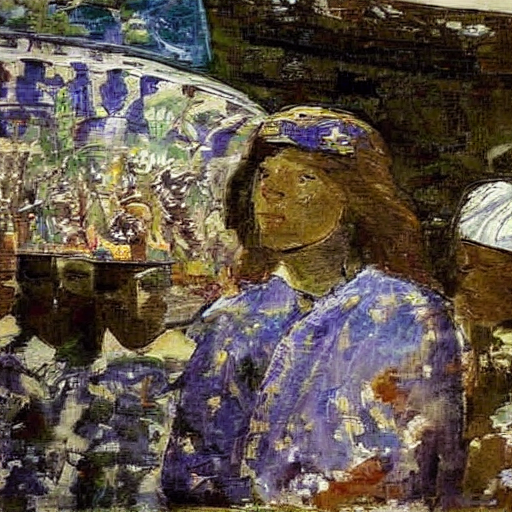
Summary
Stable Diffusion: We can create a pipeline using
StableDiffusionPipeline.from_pretrainedand give it a prompt to generate images.Stable Diffusion with Classifier-Free Guidance: We can create a pipeline using
StableDiffusionPipeline.from_pretrainedand give it a prompt AND aguidance_scaleto generate images that look closer to the prompt the higher theguidance_scale.Stable Diffusion with Negative Prompting: We can create a pipeline using
StableDiffusionPipeline.from_pretrainedand give it a prompt AND anegative_promptto generate images that look as different to the negative prompt as possible. When guidance is used, we have two prompts - one empty and the other is the given prompt. The goal is to be closer to the given prompt. Whennegative_promptis given the the pipeline, instead of an empty string, we start from thenegative_promptstring so that we move further away from that string and towards the prompt.Stable Diffusion Image2Image: We can create a pipeline using
StableDiffusionImg2ImgPipeline.from_pretrainedand give it a prompt AND aimageto generate images that look similar to the givenimage. This is done (we will see in more details later on) by starting the diffusion process from the image and not random noise like usual.Stable Diffusion with Texual Inversion: This is a little different. Here we will get a new token id from the tokenizer by giving it some
{token: embeddings}map we downloaded OR trained ourselves. Then we will get into the embeddings of thetext_encoderand in there we will insert in the token id row, the corresponding embeddings.
What is Stable Diffusion?
Now that we have seen what these tools are, let’s dig a little deeper to understand the complexity behind these pipelines.
Stable diffusion is a type of diffusion model called Latent Diffusion model. The word latent here means that we are using some compressed representation of images instead of fully sized images. This makes the entire process faster by a significant amount and also has much lower memory requirements as the calculations are not done in pixel dimensions but in much lower dimensions.
There are three main components in latent diffusion.
- An autoencoder (VAE).
- A U-Net.
- A text-encoder, e.g. CLIP’s Text Encoder.
The output of the U-Net, being the noise residual, is used to compute a denoised latent image representation via a scheduler algorithm. Many different scheduler algorithms can be used for this computation, each having its pros and cons. For Stable Diffusion, we recommend using one of:
- PNDM scheduler (used by default)
- DDIM scheduler
- K-LMS scheduler
The flow of the data through these components is shown in the diagram below:

We can actually extract each of the three components and scheduler from the pipeline we have been using.
vae = pipe.vae
text_encoder = pipe.text_encoder
tokenizer = pipe.tokenizer
unet = pipe.unet
scheduler = pipe.scheduler
Let’s take a look at the latent version of an image
images = []

def latents_callback(i, t, latents):
    latents = 1 / 0.18215 * latents # these seemingly random numbers are just from the papers
    image = vae.decode(latents).sample[0]
    image = (image / 2 + 0.5).clamp(0, 1)
    image = image.cpu().permute(1, 2, 0).numpy()
    images.extend(pipe.numpy_to_pil(image))

prompt = "Portrait painting of Jeremy Howard looking happy."
torch.manual_seed(9000)
final_image = pipe(prompt, callback=latents_callback, callback_steps=12, num_inference_steps=48).images[0]
image_grid(images, rows=1, cols=len(images))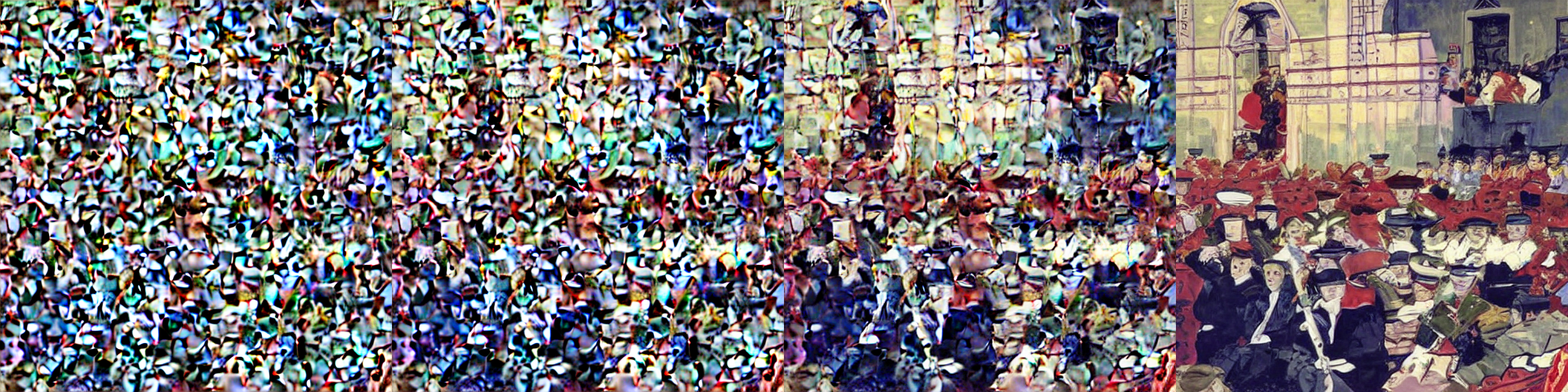
The autoencoder used in Stable Diffusion has a reduction factor of 8 but uses 4 channels instead of 3. This means that an image of shape (3, 512, 512) becomes (4, 64, 64) in latent space, which requires 8 × 8 × 3/4 = 48 times less memory.
Stable Diffusion Pieces - VAE, U-Net, CLIP
Let’s create these one at a time and write out our stable diffusion pipeline (inference) code explicitly.
We’ll go through the process of loading and plugging the pieces to see how we could have written it ourselves. We’ll start by loading all the modules that we need from their pretrained weights.
We need to get all three pieces: VAE, U-Net, and CLIP tokenizer and text model
from diffusers import AutoencoderKL, UNet2DConditionModel

vae = AutoencoderKL.from_pretrained("stabilityai/sd-vae-ft-ema", torch_dtype=torch.float16).to("cuda")
unet = UNet2DConditionModel.from_pretrained("CompVis/stable-diffusion-v1-4", subfolder="unet", torch_dtype=torch.float16).to("cuda")
Before we move on to downloading the text encoder and tokenizer let’s take a look at what the VAE actually does to an image!
from torchvision import transforms as tfms

def pil2latent(img):
    with torch.no_grad(): # we want the latents to be in a batch so use .unsqueeze(0)
        latent = vae.encode(tfms.ToTensor()(img).unsqueeze(0).half().to("cuda") * 2 - 1)
    return 0.18215 * latent.latent_dist.sample() # every latent comes with a variable called `latent_dist` from which you can sample

def latents2pil(latents):
    latents = (1 / 0.18215) * latents
    with torch.no_grad():
        imgs = vae.decode(latents).sample
    imgs = (imgs / 2 + 0.5).clamp(0, 1).detach().cpu().permute(0, 2, 3, 1).numpy() # [batchsz, width, height, channel]
    imgs = (imgs * 255).round().astype("uint8")
    pil_images = [Image.fromarray(img) for img in imgs]
    return pil_images
# download an image
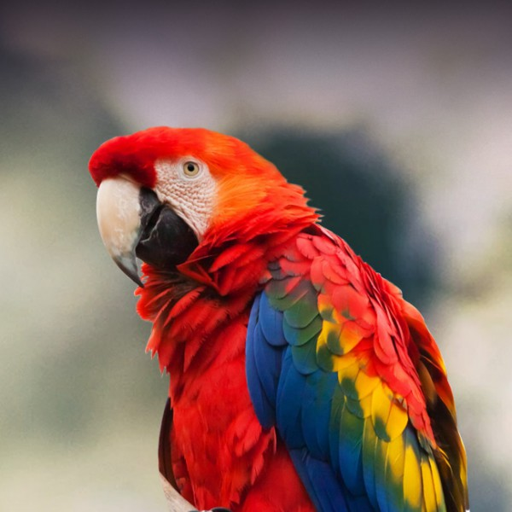
img_file = FastDownload().download('https://lafeber.com/pet-birds/wp-content/uploads/2018/06/Scarlet-Macaw-2.jpg')
input_img = Image.open(img_file).resize((512, 512))
input_img
105.46% [65536/62145 00:00<00:00]
encoded = pil2latent(input_img)
encoded.shape # [1, 4, 64, 64]
torch.Size([1, 4, 64, 64])fig, axs = plt.subplots(1, 4, figsize=(16, 4))
for c in range(4):
axs[c].imshow(encoded[0][c].cpu(), cmap='Greys')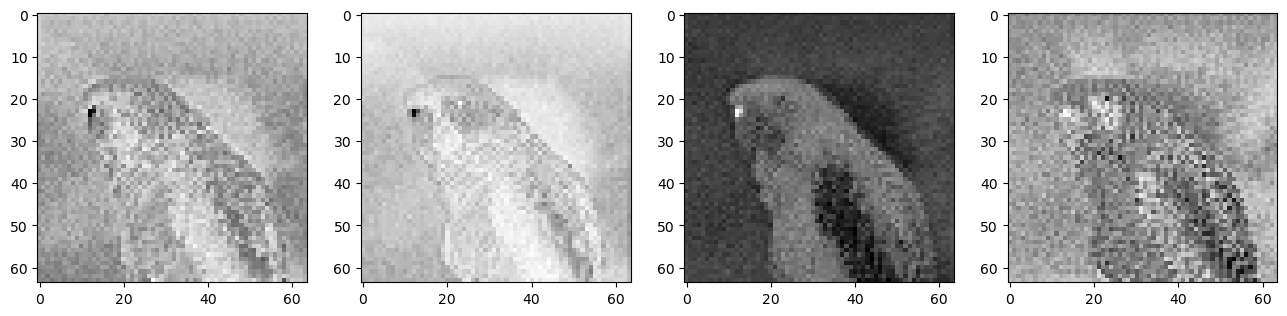
latents2pil(encoded)[0]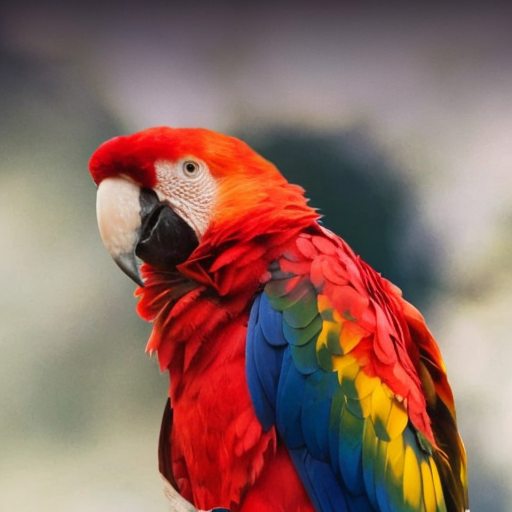
from transformers import CLIPTextModel, CLIPTokenizer

tokenizer = CLIPTokenizer.from_pretrained("openai/clip-vit-large-patch14", torch_dtype=torch.float16)
text_encoder = CLIPTextModel.from_pretrained("openai/clip-vit-large-patch14", torch_dtype=torch.float16).to("cuda")
Next we need to get our noise scheduler. But before that we need to be careful about doing things like the way we are supposed to.
To make things a bit different, we’ll use another scheduler. The standard pipeline uses the PNDM Scheduler, but we’ll use Katherine Crowson’s excellent K-LMS scheduler.
We need to be careful to use the same noising schedule that was used during training. The schedule is defined by the number of noising steps and the amount of noise added at each step, which is derived from the beta parameters.
In the case of the k-LMS scheduler, this is how the betas evolve during the 1000 steps of the noising process used during training:
beta_start, beta_end = 0.00085, 0.012

plt.plot(torch.linspace(beta_start**0.5, beta_end**0.5, 1000) ** 2)
plt.xlabel('Timestep')
plt.ylabel('β');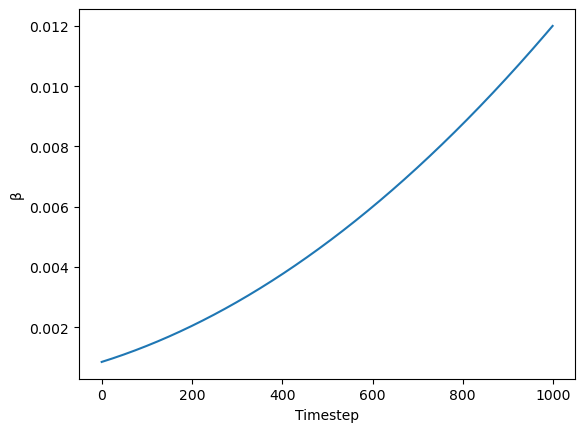
from diffusers import LMSDiscreteScheduler

scheduler = LMSDiscreteScheduler(beta_start=beta_start, beta_end=beta_end, beta_schedule="scaled_linear", num_train_timesteps=1000)
Now we define the inference/generation parameters
prompt = ["a photograph of an astronaut riding a horse"]

height = 512
width = 512
num_inference_steps = 70
guidance_scale = 7.5
batch_size = 1
Now we have all the pieces in place. Let’s start using these pieces.
Prompt Tokenization and Embedding
text_input = tokenizer(prompt, padding="max_length", max_length=tokenizer.model_max_length, truncation=True, return_tensors="pt")This will return a dictionary of input_ids and attention_mask which are needed for transformers.
text_input{'input_ids': tensor([[49406, 320, 8853, 539, 550, 18376, 6765, 320, 4558, 49407,
49407, 49407, 49407, 49407, 49407, 49407, 49407, 49407, 49407, 49407,
49407, 49407, 49407, 49407, 49407, 49407, 49407, 49407, 49407, 49407,
49407, 49407, 49407, 49407, 49407, 49407, 49407, 49407, 49407, 49407,
49407, 49407, 49407, 49407, 49407, 49407, 49407, 49407, 49407, 49407,
49407, 49407, 49407, 49407, 49407, 49407, 49407, 49407, 49407, 49407,
49407, 49407, 49407, 49407, 49407, 49407, 49407, 49407, 49407, 49407,
49407, 49407, 49407, 49407, 49407, 49407, 49407]]), 'attention_mask': tensor([[1, 1, 1, 1, 1, 1, 1, 1, 1, 1, 0, 0, 0, 0, 0, 0, 0, 0, 0, 0, 0, 0, 0, 0,
0, 0, 0, 0, 0, 0, 0, 0, 0, 0, 0, 0, 0, 0, 0, 0, 0, 0, 0, 0, 0, 0, 0, 0,
0, 0, 0, 0, 0, 0, 0, 0, 0, 0, 0, 0, 0, 0, 0, 0, 0, 0, 0, 0, 0, 0, 0, 0,
0, 0, 0, 0, 0]])}tokenizer.decode(49407)'<|endoftext|>'The input ids are then passed to a text model to create embeddings.
text_embeddings = text_encoder(text_input.input_ids.to("cuda")).last_hidden_state.half()
tokenizer.model_max_length, text_embeddings.shape # [batch_sz, seq_len i.e. num tokens, features per token]
(77, torch.Size([1, 77, 768]))Let’s also create the embeddings for the unconditional string.
max_length = text_input.input_ids.shape[-1]
uncond_input = tokenizer(
    [""] * batch_size, padding="max_length", max_length=max_length, truncation=True, return_tensors="pt"
)
uncond_embeddings = text_encoder(uncond_input.input_ids.to("cuda")).last_hidden_state.half()
uncond_embeddings.shape
torch.Size([1, 77, 768])For classifier-free guidance, we need to do two forward passes. One with the conditioned input (text_embeddings), and another with the unconditional embeddings (uncond_embeddings). In practice, we can concatenate both into a single batch to avoid doing two forward passes.
text_embeddings = torch.cat([uncond_embeddings, text_embeddings])
text_embeddings.shape
torch.Size([2, 77, 768])Now we can start the denoising process. The steps are:
initialize latents from random gaussian noise.
Set schedule timesteps to
num_inference_stepsScale the latents by the scheduler specific initial stdev
Start the loop
torch.manual_seed(1000)

latents = torch.randn(batch_size, unet.config.in_channels, height//8, width//8).half().to("cuda")
latents.shape
torch.Size([1, 4, 64, 64])So each image is compressed to 64 x 64 shape and has 4 channels. After the denoising we will use the vae.decode to get the original 3 x 512 x 512 images back.
scheduler.set_timesteps(num_inference_steps)scheduler.init_noise_sigma??Type: property String form: <property object at 0x783516715a30> Source: # scheduler.init_noise_sigma.fget @property def init_noise_sigma(self): # standard deviation of the initial noise distribution if self.config.timestep_spacing in ["linspace", "trailing"]: return self.sigmas.max() return (self.sigmas.max() ** 2 + 1) ** 0.5
We scale the latents by the max sigma of the scheduler which is the initial value of the sigma (look at the plot)
latents = latents * (max(sigmas) ** 2 + 1) ** 0.5 and this is done using the latents *= scheduler.init_noise_sigmas
latents *= scheduler.init_noise_sigmascheduler.timesteps, scheduler.timesteps.shape(tensor([999.0000, 984.5217, 970.0435, 955.5652, 941.0870, 926.6087, 912.1304,
897.6522, 883.1739, 868.6957, 854.2174, 839.7391, 825.2609, 810.7826,
796.3043, 781.8261, 767.3478, 752.8696, 738.3913, 723.9130, 709.4348,
694.9565, 680.4783, 666.0000, 651.5217, 637.0435, 622.5652, 608.0870,
593.6087, 579.1304, 564.6522, 550.1739, 535.6957, 521.2174, 506.7391,
492.2609, 477.7826, 463.3043, 448.8261, 434.3478, 419.8696, 405.3913,
390.9130, 376.4348, 361.9565, 347.4783, 333.0000, 318.5217, 304.0435,
289.5652, 275.0870, 260.6087, 246.1304, 231.6522, 217.1739, 202.6957,
188.2174, 173.7391, 159.2609, 144.7826, 130.3043, 115.8261, 101.3478,
86.8696, 72.3913, 57.9130, 43.4348, 28.9565, 14.4783, 0.0000],
dtype=torch.float64),
torch.Size([70]))scheduler.sigmas, scheduler.sigmas.shape(tensor([14.6146, 13.3974, 12.3033, 11.3184, 10.4301, 9.6279, 8.9020, 8.2443,
7.6472, 7.1044, 6.6102, 6.1594, 5.7477, 5.3709, 5.0258, 4.7090,
4.4178, 4.1497, 3.9026, 3.6744, 3.4634, 3.2680, 3.0867, 2.9183,
2.7616, 2.6157, 2.4794, 2.3521, 2.2330, 2.1213, 2.0165, 1.9180,
1.8252, 1.7378, 1.6552, 1.5771, 1.5031, 1.4330, 1.3664, 1.3030,
1.2427, 1.1852, 1.1302, 1.0776, 1.0272, 0.9788, 0.9324, 0.8876,
0.8445, 0.8029, 0.7626, 0.7236, 0.6858, 0.6490, 0.6131, 0.5781,
0.5438, 0.5102, 0.4770, 0.4443, 0.4118, 0.3795, 0.3470, 0.3141,
0.2805, 0.2455, 0.2084, 0.1672, 0.1174, 0.0292, 0.0000]),
torch.Size([71]))plt.plot(scheduler.sigmas[:-1], scheduler.timesteps)
plt.xlabel("Noise")
plt.ylabel("Timesteps")Text(0, 0.5, 'Timesteps')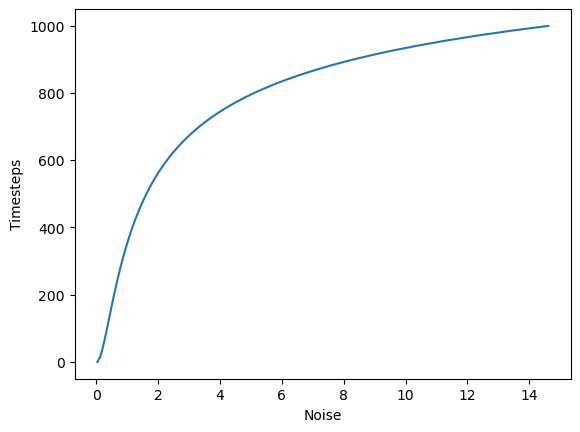
For each timestep in the denoising process:
- Get the inputs
- Scale the inputs using the scheduler and the time step
- Get the predicted noise from the unet
- separate the prediction for the text input and the unconditioned input
- calculate the prediction using the unconditioned and text predictions
- update the latents
from tqdm.auto import tqdmfor i, t in enumerate(tqdm(scheduler.timesteps)):
input = torch.cat([latents] * 2)
# this step undos the scaling of the latents (the scaling we performed using scheduler.init_noise_sigmas)
input = scheduler.scale_model_input(input, t)
with torch.no_grad():
preds = unet(input, t, encoder_hidden_states=text_embeddings).sample
pred_uncond, pred_text = preds.chunk(2)
preds = pred_uncond + guidance_scale * (pred_text - pred_uncond)
latents = scheduler.step(preds, t, latents).prev_sampleOnce denoised we will decode it to its original shape in pixel space and show it
with torch.no_grad():
    image = vae.decode(1 / 0.18215 * latents).sample

image = (image / 2 + 0.5).clamp(0, 1)
image = image[0].detach().cpu().permute(1, 2, 0).numpy() # change axes to PIL format of (width, height, channels)
image = (image * 255).round().astype("uint8") # unnormalize
Image.fromarray(image)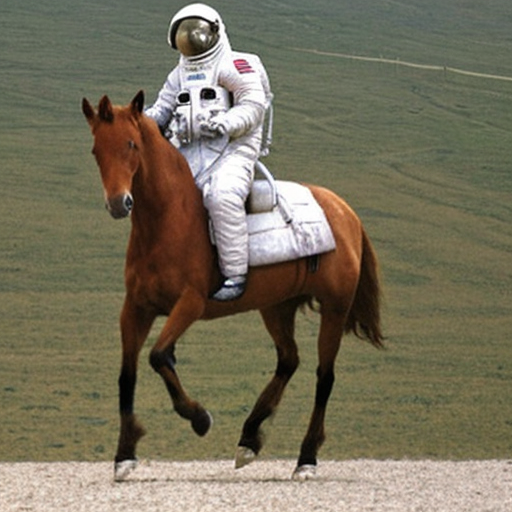
Full Stable Diffusion using VAE, U-Net, CLIP and Scheduler Code
!pip install -Uq diffusers transformers fastcoreimport logging
from pathlib import Path
import matplotlib.pyplot as plt
import torch
from diffusers import StableDiffusionPipeline
from fastcore.all import concat
from huggingface_hub import notebook_login
from PIL import Image
logging.disable(logging.WARNING)
torch.manual_seed(1)
if not (Path.home()/'.cache/huggingface'/'token').exists(): notebook_login()from transformers import CLIPTextModel, CLIPTokenizer
from diffusers import AutoencoderKL, UNet2DConditionModel, LMSDiscreteScheduler
from tqdm.auto import tqdm
vae = AutoencoderKL.from_pretrained("stabilityai/sd-vae-ft-ema", torch_dtype=torch.float16).to("cuda")
unet = UNet2DConditionModel.from_pretrained("CompVis/stable-diffusion-v1-4", subfolder="unet", torch_dtype=torch.float16).to("cuda")
tokenizer = CLIPTokenizer.from_pretrained("openai/clip-vit-large-patch14", torch_dtype=torch.float16)
text_encoder = CLIPTextModel.from_pretrained("openai/clip-vit-large-patch14", torch_dtype=torch.float16).to("cuda")
beta_start, beta_end = 0.00085, 0.012
scheduler = LMSDiscreteScheduler(beta_start=beta_start, beta_end=beta_end, beta_schedule="scaled_linear", num_train_timesteps=1000)
width = 512
height = 512
def text_enc(prompts, maxlen=None):
inp = tokenizer(prompts, padding="max_length", max_length=tokenizer.model_max_length, truncation=True, return_tensors="pt")
return text_encoder(inp.input_ids.to("cuda")).last_hidden_state.half()
def make_samples(prompts, g=7.5, seed=100, steps=70):
batch_size = len(prompts)
text = text_enc(prompts)
uncond = text_enc([""] * batch_size, maxlen=text.shape[:-1])
embeddings = torch.cat([uncond, text])
latents = torch.randn(batch_size, unet.config.in_channels, height//8, width//8).half().to("cuda")
scheduler.set_timesteps(steps)
latents *= scheduler.init_noise_sigma
for i, t in enumerate(tqdm(scheduler.timesteps)):
inputs = torch.cat([latents] * 2)
inputs = scheduler.scale_model_input(inputs, t)
with torch.no_grad():
preds = unet(inputs, t, encoder_hidden_states=embeddings).sample
uncond_pred, text_pred = preds.chunk(2)
preds = uncond_pred + g * (text_pred - uncond_pred)
latents = scheduler.step(preds, t, latents).prev_sample
with torch.no_grad():
return vae.decode(1 / 0.18215 * latents).sample
def make_img(t):
image = (t/2+0.5).clamp(0,1).detach().cpu().permute(1, 2, 0).numpy()
return Image.fromarray((image*255).round().astype("uint8"))from IPython.display import display
prompts = [
'a photograph of an astronaut riding a horse',
'an oil painting of an astronaut riding a horse in the style of grant wood'
]
images = make_samples(prompts, steps=80)for img in images: display(make_img(img))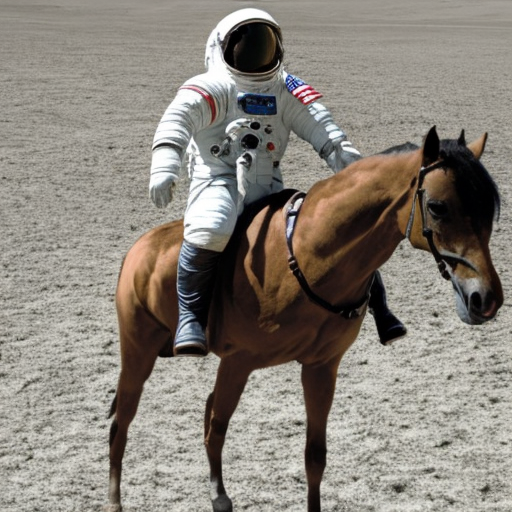
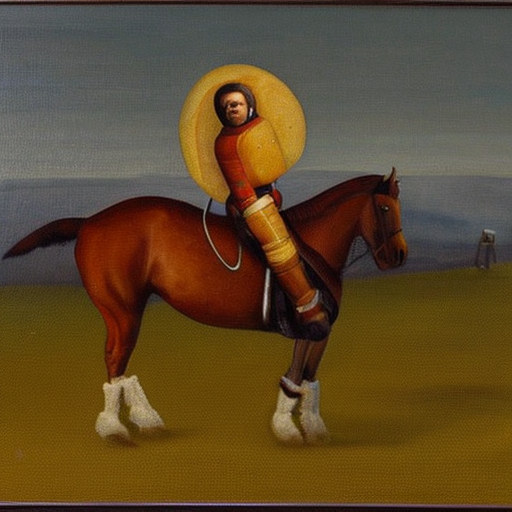
Stable Diffusion with Negative Prompting
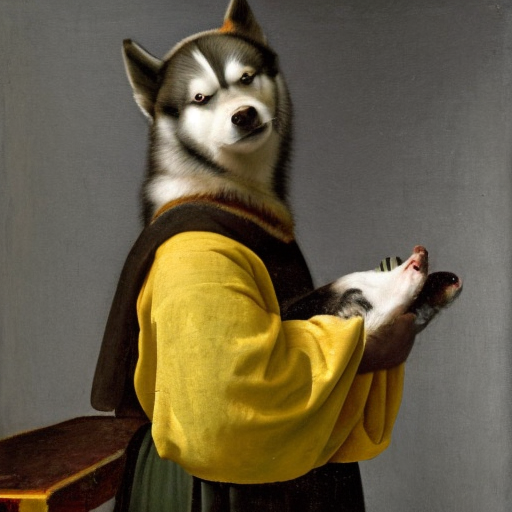
Remember we said for negative prompting, the only difference is instead of an empty string we use the negative prompt string and we move away from it just like in guidance-free
def make_samples(prompts, negative_prompt=None, g=7.5, seed=100, steps=70):

    batch_size = len(prompts)
    text = text_enc(prompts)
    uncond_prompt = negative_prompt if negative_prompt else ""
    uncond = text_enc([uncond_prompt] * batch_size, maxlen=text.shape[:-1])
    embeddings = torch.cat([uncond, text])

    latents = torch.randn(batch_size, unet.config.in_channels, height//8, width//8).half().to("cuda")
    scheduler.set_timesteps(steps)
    latents *= scheduler.init_noise_sigma

    for i, t in enumerate(tqdm(scheduler.timesteps)):
        inputs = torch.cat([latents] * 2)
        inputs = scheduler.scale_model_input(inputs, t)
        with torch.no_grad():
            preds = unet(inputs, t, encoder_hidden_states=embeddings).sample

        uncond_pred, text_pred = preds.chunk(2)
        preds = uncond_pred + g * (text_pred - uncond_pred)
        latents = scheduler.step(preds, t, latents).prev_sample


    with torch.no_grad():
        return vae.decode(1 / 0.18215 * latents).sample
from IPython.display import display
prompts = [
'"Labrador in the style of Vermeer"',
'"Husky in the style of Vermeer"'
]
images = make_samples(prompts, negative_prompt = "blue", steps=100)for img in images: display(make_img(img))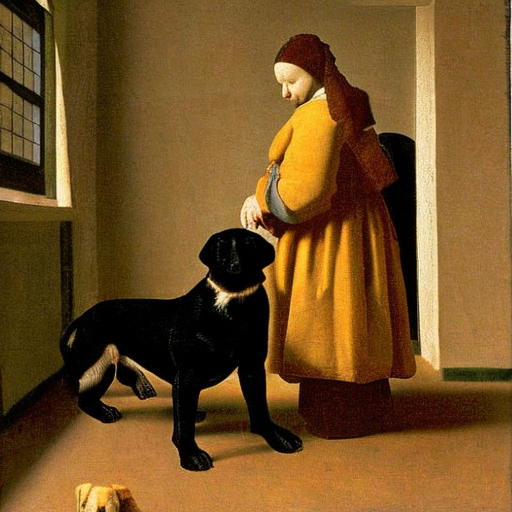
Stable Diffusion Image2Image
This one is a little bit more different. The three key differences are:
The latents are not initialized as random noise but instead as the latent version of the init image
Instead of scaling the latent with
scheduler.init_noise_sigmawe now uselatents = scheduler.add_noise(encoded, noise, timesteps=torch.tensor([scheduler.timesteps[start_step]]))which essentially computesnoisy_samples = original_samples + noise * sigmasand the sigma in this formula is sampled from the specifiedstart_stepWe start the denoising process after a certain number of steps (
start_step) because initially there is too much noise and it will just ruin our initial image
def make_samples(prompts, init_img=None, start_step = 10, g=7.5, seed=100, steps=70):
    batch_size = len(prompts)
    text = text_enc(prompts)
    uncond = text_enc([""] * batch_size, maxlen=text.shape[:-1])
    embeddings = torch.cat([uncond, text])
    scheduler.set_timesteps(steps)
#     latents = torch.randn(batch_size, unet.config.in_channels, height//8, width//8).half().to("cuda")
#     latents *= scheduler.init_noise_sigma
    latents = pil2latent(init_img)
    noise = torch.randn_like(latents)
    latents = scheduler.add_noise(latents, noise, timesteps=torch.tensor([scheduler.timesteps[start_step]]))
    latents = latents.half().to("cuda")
    for i, t in enumerate(tqdm(scheduler.timesteps)):
        if i > start_step:
            inputs = torch.cat([latents] * 2)
            inputs = scheduler.scale_model_input(inputs, t)
            with torch.no_grad():
                preds = unet(inputs, t, encoder_hidden_states=embeddings).sample

            uncond_pred, text_pred = preds.chunk(2)
            preds = uncond_pred + g * (text_pred - uncond_pred)
            latents = scheduler.step(preds, t, latents).prev_sample


    with torch.no_grad():
        return vae.decode(1 / 0.18215 * latents).sample
input_img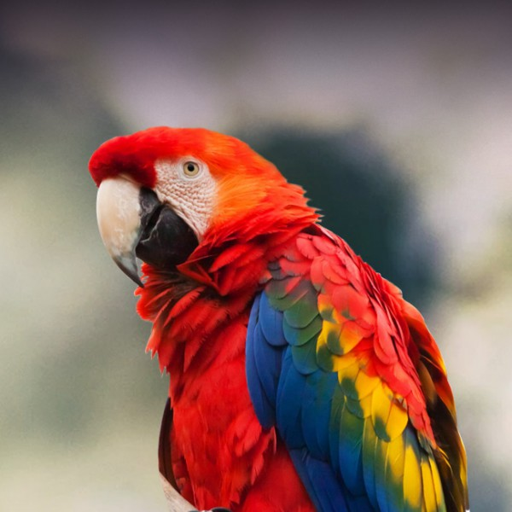
from IPython.display import display

prompts = [
    '"A colorful dancer, nat geo photo"'
]

images = make_samples(prompts, init_img = input_img, start_step=15, steps=100)
for img in images: display(make_img(img))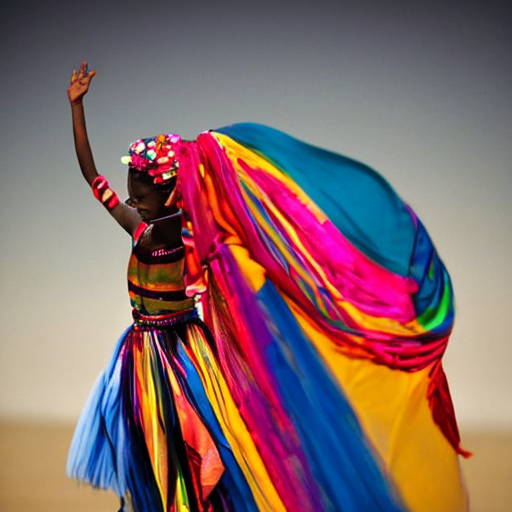
For anyone who found this interesting, this is only the very beginning of all the research that went into diffusion models. You can find much more to dig into (just as I am) once these few steps make sense as they are the foundational elements of diffusion.