This blog is about decorators in Python, the different types that exist in the language, and how to use them. Learning them can be of great use as they are very widely used in many incredible libraries like Django, Flask, fastcore, as well as the standard library. Much like last time on the blog about callables, a bunch of these ideas are taken from the absolutely incredible (but long) book, Fluent Python.
Author
Uzair Tahamid Siam
Published
April 1, 2023
In Python, decorators are an incredibly resourceful tool to create resuable code. They are modifiers that change the behavior of a function or a class without changing the actual source code.
Decorators are implemented as functions that take another function as parameters and (usually) return a new function that wraps the original function with some additional functionality.
Well, now THAT is a mouthful. The first time I came across a decorator, I was confused. But, the first time I came across this definition I was even more confused. This blog post is dedicated to be a more example driven exposure to decorators. We will start by looking at a simple example, then do a case study on a very fascinating decorator - @singledispatch. This will be followed up by looking at decorators that take arguments called decorator factory and finally see how we can decorate classes just like we can decorate functions.
A simple example
To start off, we will create a function that can help us log (or in this case simply print) what function is running, what are the arguments, and the result. Keep in mind, that this function we are creating should be able to do this for as many functions as possible if not all functions because that is a core idea of making decorators - reusability.
def logger(func):def wrapper(*args, **kwargs): args_strs = [repr(arg) for arg in args] kwargs_strs = [f"{k}={v!r}"for k, v in kwargs.items()] arguments =", ".join(args_strs + kwargs_strs)print(f"Calling the function, {func.__name__}({arguments})") res = func(*args, **kwargs)print(f"{func.__name__} returned {res}")return resreturn wrapper@loggerdef add(a, b):return a + bres = add(2, 3)print(res)
Calling the function, add(2, 3)
add returned 5
5
Let’s break this down.
Decorating a function involves a total of three functions -> the decorator function, the decorated function and the modifier or the wrapper function. In this exampler, the decorator is the logger function and what it decorates, i.e. the decorated function, is the add function. The wrapper function is called the wrapper function here. While, most decorators in practice do modify the decorated function, in this example, that’s not the case. Here, we merely just print out or log what the function is taking as parameters and what it is outputing.
Behind the syntactic sugar of @decorator_function is a simple case of callables and first-class functions. The previous code is equivalent to the following:
def logger(func):def wrapper(*args, **kwargs): args_strs = [repr(arg) for arg in args] kwargs_strs = [f"{k}={v!r}"for k, v in kwargs.items()] arguments =", ".join(args_strs + kwargs_strs)print(f"Calling the function, {func.__name__}({arguments})") res = func(*args, **kwargs)print(f"{func.__name__} returned {res}")return resreturn wrapper# Notice the lack of the decorator, @loggerdef add(a, b):return a + blogged_add = logger(add)res = logged_add(2, 3)
Calling the function, add(2, 3)
add returned 5
Since, logger returns a function, we assign the name logged_add to that function. And then instead of calling add we just call the logged_add. So, decorators are just callables sprinked in syntactic sugar!
This is not that impressive and does not really make decorators seem fun, cool, and worth our time. So, let’s look at something that many people may not know about and is definitely something that I found amazing the first time I learned about it.
Decorators in the Python Library
There are a lot of really useful decorators that are already in the language’s library. One of the most important ones would be the functools.lru_cache decorator that let’s you cache results for, say, recursive algorithms. If you have ever had the bad luck of doing Leetcode, you will know how to implement a LRU Cache and the language has a built-in implementation of this idea that you can wrap around essentially any piece of function.
One the reasons why I’m talking about this specifc decorator is because it can actually also take parameters - maxsize and typed. I will not go into more details about this decorator here but feel free to check it out. When a decorator takes in a parameters it has a slightly different implementation and is called a decorator factory. We will be covering that later in this blog.
For now, let’s talk about an idea called single dispatch.
Creating Generic Functions with functools.singledispatch
To keep it simple, single dispatch is an idea in Python that allows a function to have different behaviors depending on the type of its FIRST argument (look up multiple dispatch to have different behaviors depending on ALL the arguments). The example in this case will be a simple one so we can focus on (1) how single dispatch is implemented (2) the utility of the feature.
The example will be printing out different messages depending on the argument passed to it. While one can argue why do we need that if we can just use conditionals to handle such things, think about how ugly a piece of code would end up looking if it had tens of conditionals in it for every possible type. Single dispatch not only helps us make it look more elegant but also helps us debug and fix problems much better thanks to the idea of seperation of concerns.
import functools@functools.singledispatchdef processMessage(message):raiseNotImplementedError("Unsupported message type")@processMessage.registerdef _(message: str):## Some processing code hereprint("Processed string message: {message}")@processMessage.registerdef _(message: dict):## Some processing code hereif"data"in message:print("Processed JSON message with data: {message['data']}")else: print("Processed JSON message: {message}")@processMessage.registerdef _(message: bytes):## Some processing code hereprint("Processed binary message of length {len(message)}")
The implementation above has different behaviors for messages that are strings, dictionaries, bytes, and anything else. The default behavior is implemented first in processMessage and in this case we chose to just raise an exception. You could replace that with any default behavior. You call the decorator on the function that describes this default behavior. For the rest of the functions you (1) just name them with a _ (2) register them under the default function with @defaultFunctionName.register
Single dispatch is useful because it simplifies code organization and logic, improves code readability, increases extensibility, and enables polymorphism. With single dispatch you can register specialized functions anywhere in the system, in any module. If you later add a module with a new user-defined type, you can easily provide a new custom function to handle that type.
Fluent Python has a much more advanced example of parsing html differently for different inputs like strings, sequences, fractions etc. Here, I wanted to showcase this amazing tool that the library provides to make our code vastly better from an organizational perspective with very little effort.
Parameterized Decorators - Decorator factories
As we talked about before, some decorators take parameter inputs. When they do so, they are given the named parameterized decorators or decorator factories. The reason why they are called a factory is because they actually return a decorator. Remember, normal (non-parameterized) decorators return the inside function which we called the wrapper but parameterized-decorators return a decorator which in turn returns the wrapper function which in turn returns the result of running the decorated function.
If you were confused by the layers of what is happening with decorators, now there’s an extra layer happening. As the title says, we will be using an example to understand what I’m talking about.
Let’s create a parameterized decorator that takes as an input repeat which represents how many times to run the decorated function. Then we will calculate the average time the machine took to run the decorated function repeat times.
import timedef time_it(repeat=1):def decorator(func):def wrapper(*args, **kwargs): total_time =0for i inrange(repeat): start_time = time.perf_counter() func(*args, **kwargs) end_time = time.perf_counter() total_time += (end_time - start_time) avg_time = total_time / repeatprint(f"Avg. time taken for {func.__name__} over {repeat} runs: {avg_time:.6f} seconds")return avg_timereturn wrapperreturn decorator
The wrapper function calculates the average time to run the decorated function, func, and prints out a message as well as returns the average time. As usual, the decorator function returns the wrapper function. Finally, the outermost function returns the decorator itself. We can use it now.
Avg. time taken for slow_function over 3 runs: 1.005064 seconds
1.0050641393342328
We can take in multiple parameters instead of just one if we want to. Maybe one would one to add a format specifier for the output so we can just take FMT_SPEC as a parameter in our time_it function.
This extra layer now gives us even more functionality than decorators did, thus allowing us to do even more and add constraints to the modified behavior.
Decorating a Class
Remember that decorators take in a function as a parameter. Well more generally they take a callable. That means we are not just restricted to functions anymore; we can actually decorate classes. This section is a brief demonstration of doing just that. Let’s look at adding an age constraint to instantiating a Person class.
First we define the decorator.
def validate_age(cls): original_init = cls.__init__def new_init(self, name, age):if age <0or age >120:raiseValueError("Age must be between 0 and 120") original_init(self, name, age) cls.__init__= new_initreturn cls
The class decorator, not very surprisingly, takes a class as a parameter. Then it modifies the behavior in some way. In this case, the modification is adding an age constraint. If the age is not between 0 and 120 it raises an exception. Otherwise, it just shows the same behavior as the original instance. Finally, the modified class is returned.
Let’s define a simple class and test it out.
@validate_ageclass Person:def__init__(self, name, age):self.name = nameself.age = agep1 = Person("Alice", 25) # creates a Person object with age = 25# raises a ValueError: "Age must be between 0 and 120"# p2 = Person("Bob", 150)
The first instance, p1 is successfully created. But, when we try to create a Person instance p2 with an age over 120, we get the exception we expect.
Class decorators are important more or less for the same reasons as function decorators. They provide a way to modify the behavior of classes and their methods at runtime, without having to change their code directly. This can be especially helpful when working with third-party libraries or legacy code, where you may not have direct access to the source code.
Subtleties in Decorators
As you might have a sense by now, decorators are very powerful and useful. But as Uncle Ben said, with great power comes great responsibility. To use them well we should have a good understanding of them. In this section I will try to give a better sense of decorator behavior and some of the gotchas.
Execution of Decorators
Decorator functions are actually executed right after the decorated function is defined and that is usually at import time when a module is loaded. This is demonstrated extremely well in the Fluent Python book so I will show a snapshot of that demonstration.
running register(<function f1 at 0x1210fa7a0>)
running register(<function f2 at 0x1210fab00>)
running main()
registry -> [<function f1 at 0x1210fa7a0>, <function f2 at 0x1210fab00>]
running f1()
running f2()
running f3()
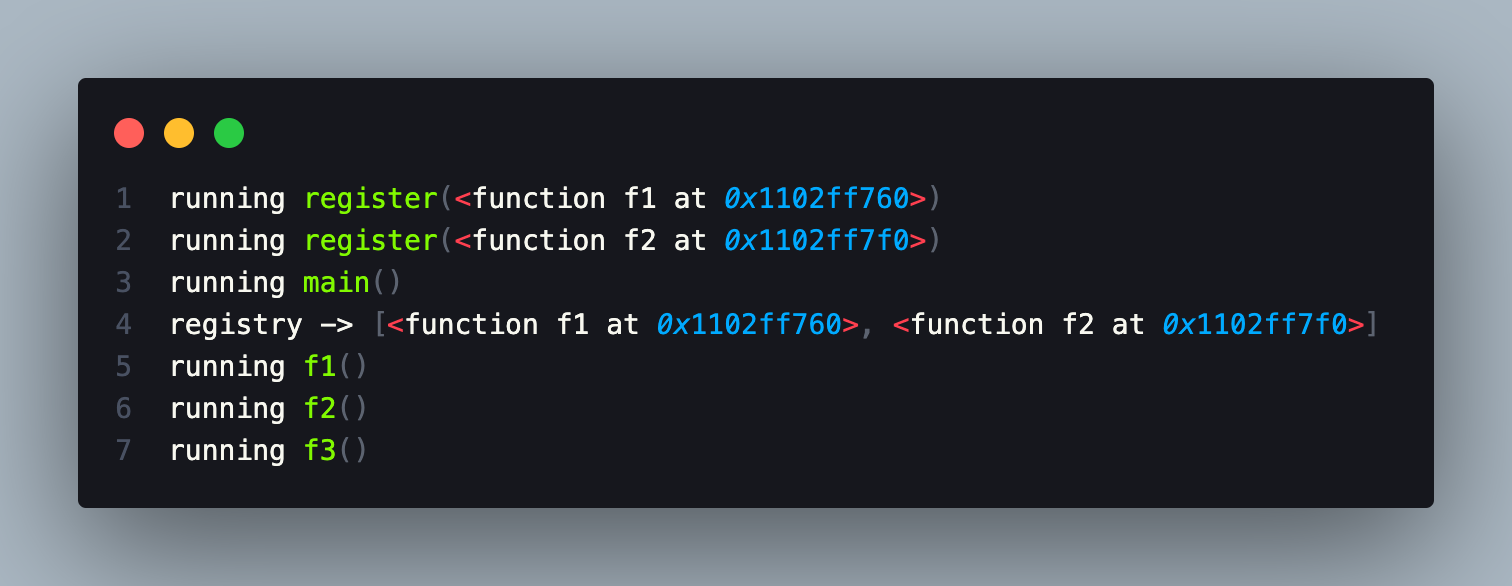
Running the above code will return this:
So what exactly happend?
Here’s what each line of output means:
running register(<function f1 at 0x1102ff760>): This is printed when the register decorator is APPLIED to the f1 function. The decorator prints this line of output, adds the f1 function to the registry list, and then returns the original f1 function unchanged.
running register(<function f2 at 0x1102ff7f0>): This is printed when the register decorator is applied to the f2 function. The decorator prints this line of output, adds the f2 function to the registry list, and then returns the original f2 function unchanged.
running main(): This is printed when the main function is called.
registry -> [<function f1 at 0x1102ff760>, <function f2 at 0x1102ff7f0>]: This is printed when the main function is called, after the registry list has been populated by the register decorator with the f1 and f2 functions.
running f1(): This is printed when the f1 function is called.
running f2(): This is printed when the f2 function is called.
running f3(): This is printed when the f3 function is called from within the main function.
The most important thing to take away here is that, the registry list got populated even before the main function was ran because the decorators run as soon as they decorate a function.
Name and Docstring
When you use a decorator on a function or a class, the original function or class name and docstring are lost. Instead, they are replaced with the name and docstring of the decorator function. To avoid this issue, you can use the functools.wraps decorator from the standard library to preserve the original name and docstring.
Stacking decorators
You can actually apply multiple decorators to a function or class. When you do so, they are executed in the order in which they are listed. This can be important if the decorators depend on each other or if they modify the same aspects of the function or class. Here’s a simple example of stacked decorators generated by ChatGPT.
When you use a decorator on a function, the decorator function has access to the local and global scope of the original function. This can be useful, but it can also lead to unexpected behavior if the decorator modifies variables in the local or global scope.
Scopes are a VERY important aspect of decorators that I did not cover here. I would highly recommend looking up the different scopes in Python.
Global scope: Variables declared in the global scope are accessible anywhere in the code.
Local scope: Variables declared in the local scope (e.g. inside a function) are only accessible within that scope.
Nonlocal scope: Variables declared in an outer scope (e.g. outside a nested function) can be accessed and modified within an inner scope (e.g. inside the nested function), but are not in the global scope.
The most important one for decorators is the nonlocal scope.
Conclusion
Decorators are a powerful and flexible feature of Python that allow us to modify the behavior of functions and classes without modifying their source code. By wrapping a function or class with a decorator, we can add additional functionality, modify the input or output, and add different constraints to the behaviors.
They can make our code more concise and easier to read, as we can apply common modifications or restrictions to multiple functions using a single decorator. However, it’s important to be aware of potential gotchas, such as the impact of decorators on function signatures and the order in which multiple decorators are applied.
Overall, decorators are a valuable tool in any Python developer’s toolkit, and mastering them can greatly improve the quality and functionality of our code and take our programming skills in Python to the next level.
I plan to write my next blog on the abundance on animals in the Python landscape - ducks, geese, and monkeys ;)